
| User Roles |  Admin Admin |  Staff contributor Staff contributor | ✗External contributor | ✗Pulse user |
The Financial Reporting Standard (FRS) 102 has been updated with a significant change to lease accounting, effective for accounting periods beginning on or after 1 January 2026 (early adoption permitted).
This change introduces a single, on-balance sheet model for lessees, requiring the recognition of a Right-of-Use (ROU) asset and a corresponding lease liability for nearly all material leases. This eliminates the previous distinction between finance and operating leases (which were off-balance sheet).
The primary reason for this amendment is to improve transparency and comparability by removing "off-balance sheet financing" and giving users a truer picture of an entity's assets and obligations.
Our new working paper templates are designed to guide you through the complex data requirements, calculations and disclosures necessary for a compliant transition to the revised FRS 102. Our new accounts production templates are designed to ensure your accounts are compliant and cover all necessary disclosures as per the standards.
This article is designed to show you how to add and use the three new working paper templates necessary for the transition to the revised FRS 102 lease accounting standards.
Table of contents
Article structure
The article will specifically cover the following templates:
Working papers:
- Leases Data: the central hub for all lease information, which stores lease documents and calculates the initial ROU values for recognition.
- ROU Assets: similar to our fixed asset register, focused on calculating the appropriate depreciation of the Right-of-Use assets.
- Lease Liabilities: used to calculate the unwinding of interest and determine the closing lease liability.
Accounts production:
- Accounting policies: an additional paragraph with default wording for right of use assets and lease liabilities. This wording can be edited as necessary but provides a default starting point for our users.
- ROU Assets note: similar but separate to our fixed assets note, showing the movement for each asset class during the accounting period.
- Lease Liabilities note: used for the relevant and required disclosures around lease liabilities within 1 year and after 1 year, along with other disclosures for lease cash outflows.
This will ensure you know what you are doing when it comes to the new standards.
Working papers
Adding the new reconciliations
For accounting periods starting on or after 1 January 2026, the relevant new working papers and updates will take place automatically. However, if you are looking to early adopt these amendments for earlier accounting periods, you will need to do the following:
- First navigate to the working papers workflow.
- Select the Action button in the top right corner.
- Click Add reconciliation and find the 3 templates: Leases Data, ROU Assets, Lease Liabilities.
You must ensure that all 3 templates are added and starred to avoid any errors. The ROU Assets and Lease Liabilities templates will only pull through your lease information once the Leases Data template has been added and starred.
Note: if you have a custom workflow, not one of the standard Silverfin working papers workflows, you will need to get an admin user to add these three reconciliations into your workflow and workflow working screen via the Templates screen.
Adding the new account templates
To make sure your right of use asset and lease liability accounts are reconciled through the new templates, an admin user needs to activate the lease account templates in your firm's UK Working Papers package. This is a one-off step for your firm.
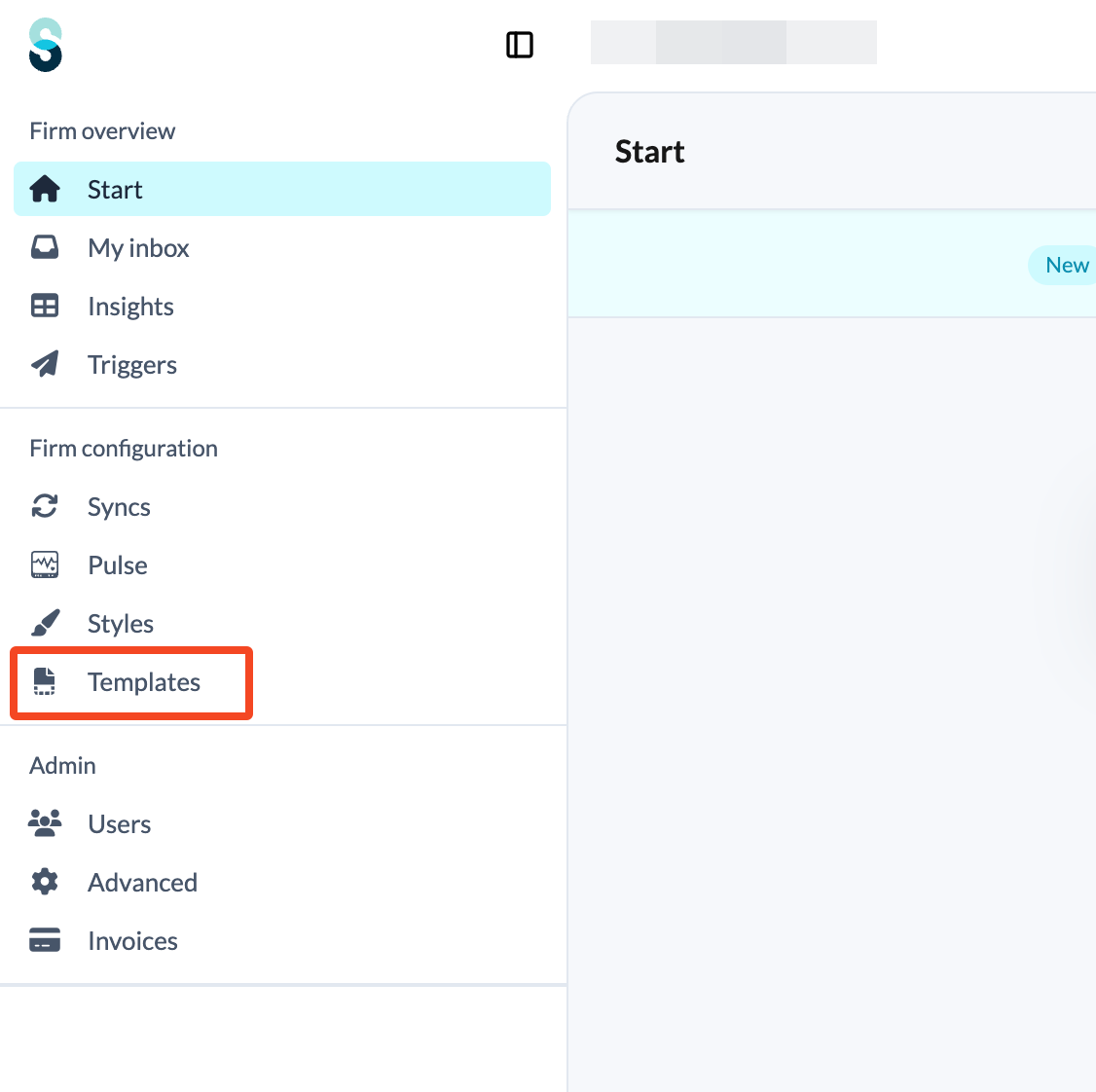
- On the firm overview screen, click the 'Template' tab.
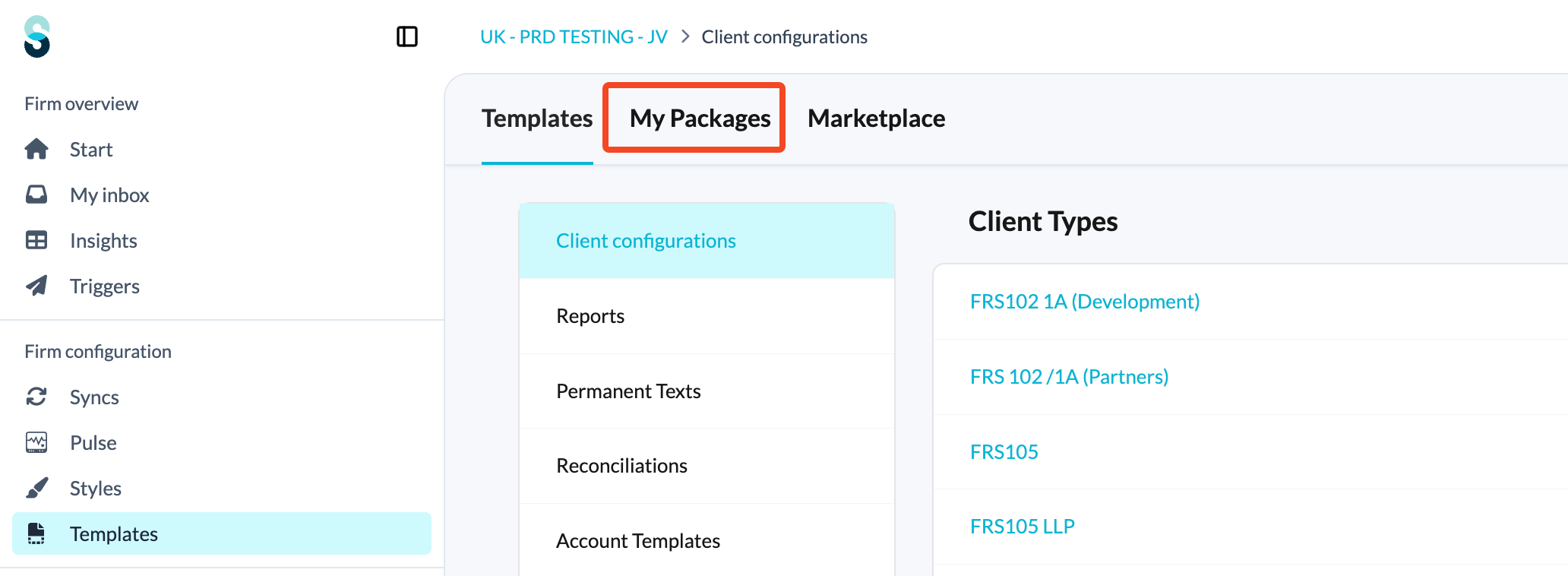
- and open the My Packages tab.
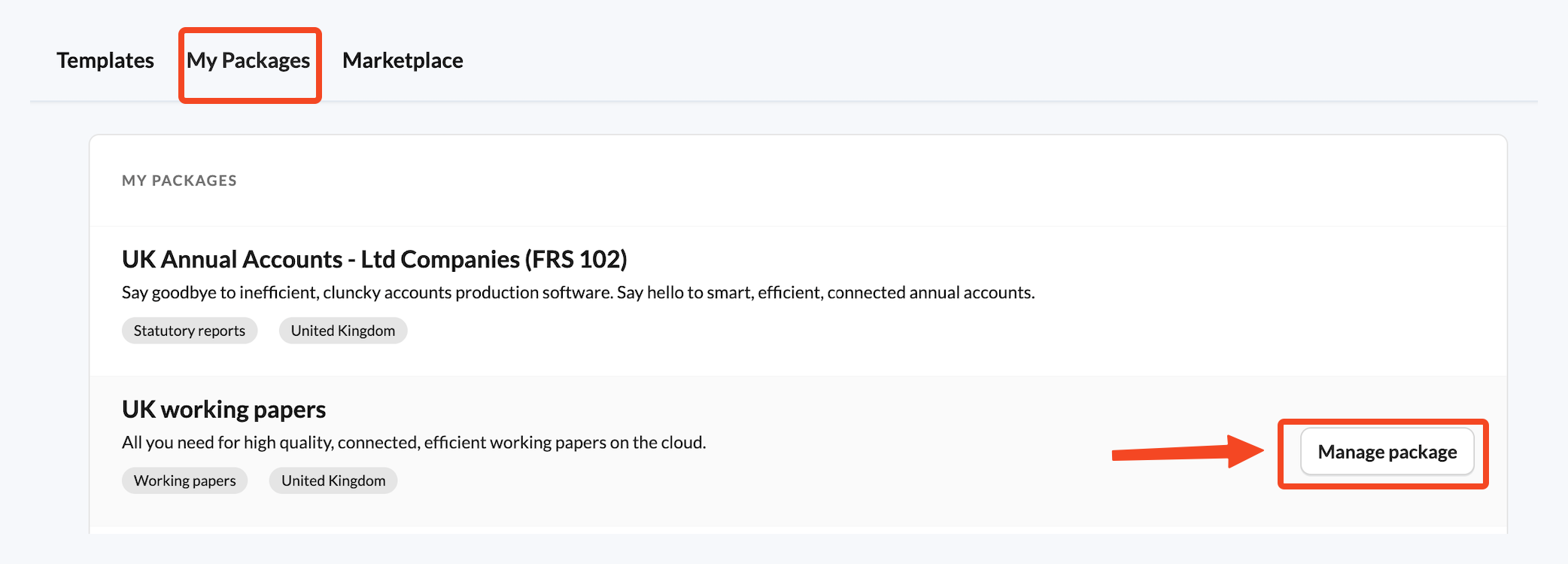
- Find the UK Working Papers package and click Manage package. This shows all of the account templates and reconciliation texts available to you in the package.
- Go down the list and activate the Reconciled via Lease liabilities and Reconciled via ROU assets account templates.

For more on what these account templates do, see How do I use the Reconciled via Lease liabilities account template? (UK Market) and How do I use the Reconciled via ROU assets account template? (UK market).
Leases Data reconciliation
This template serves as the central hub for lease information, storing any lease documents and calculating the initial ROU values for recognition.
For a full walkthrough of every field, see How do I use the Leases Data template? (UK market).
Note: look for i icons (info text) throughout the template, as these provide guidance on using the template and understanding the new standards.
Initial setup and lease details
Name the lease
Fill out the name of the lease. Once the name is populated, a separate section for that individual lease will be created below and the summary table at the top of the template will begin to populate.
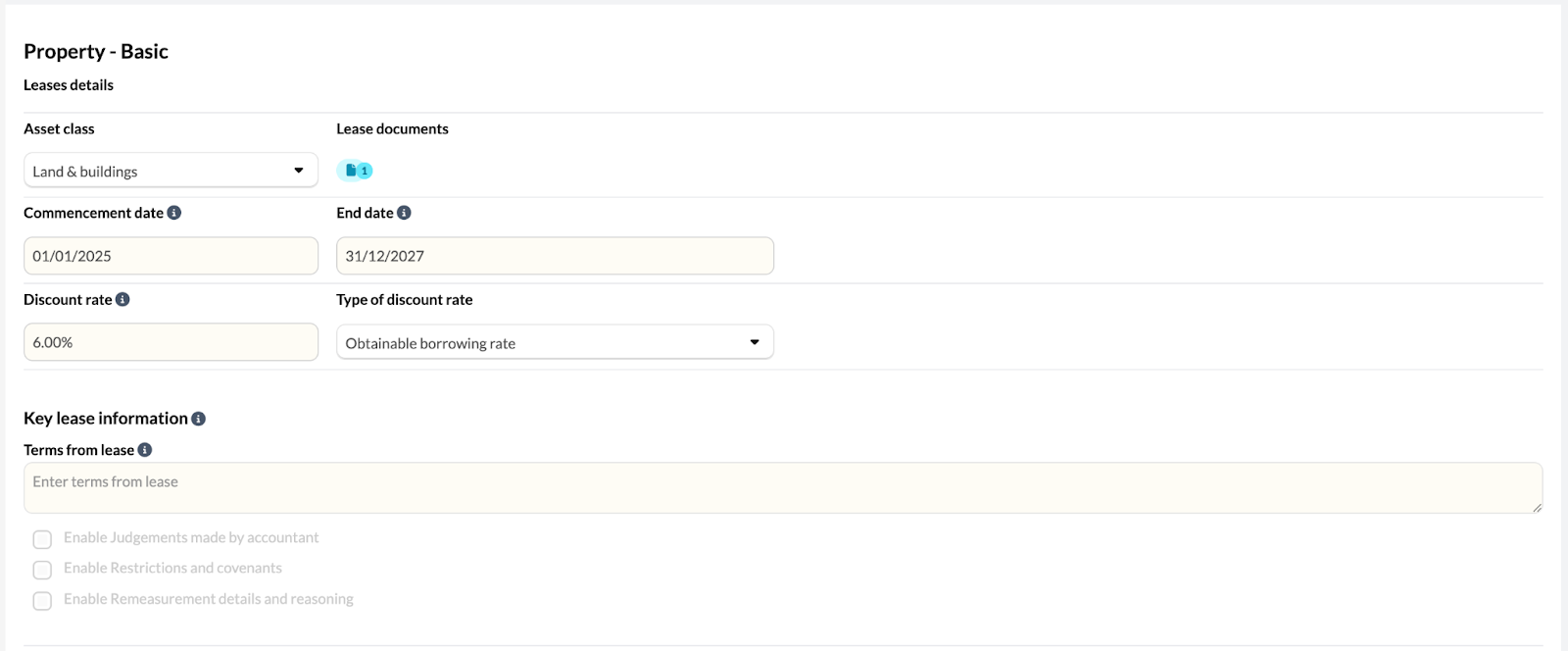
Complete lease details
In the first section, fill out the following information:
- The asset class (how the asset is categorised).
- Attach any relevant lease documents.
- The commencement date and end date.
- The discount rate and the type of discount rate used.
Document key information
Use the key lease information section to document the key terms of the lease, any judgements or adjustments made, restrictions and covenants, and record anything related to remeasurement.
ROU calculation method selection
You have two options for determining the ROU values:
- Option 1: ROU Values Calculator (Silverfin will calculate the figures for you).
- Option 2: Enter ROU Values Manually (if you have your own calculated figures and only wish to record them).
Using the ROU values calculator (Option 1)
Enter a repeating payment
For the majority of leases, these will be basic repeating payments at regular frequency. In this case, select Enter a repeating payment, select the frequency (monthly, quarterly or yearly) and then enter the payment amount in the table below. The payment dates will default to the lease term dates but can be amended if required.

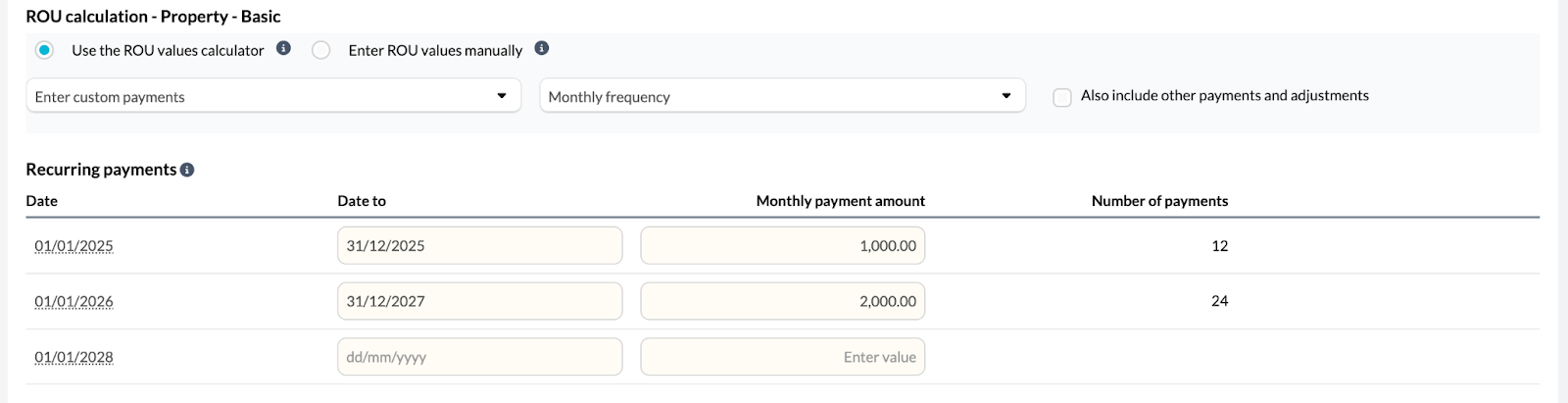
Add custom payments
If the lease payments are a little more complex, then select Enter custom payments and enter the relevant dates and payment amounts. This option is designed to be used in instances where, for example, the payment amount is £1,000 for the first year and then in the second year the payments increase to £2,000.
Record other payments and adjustments
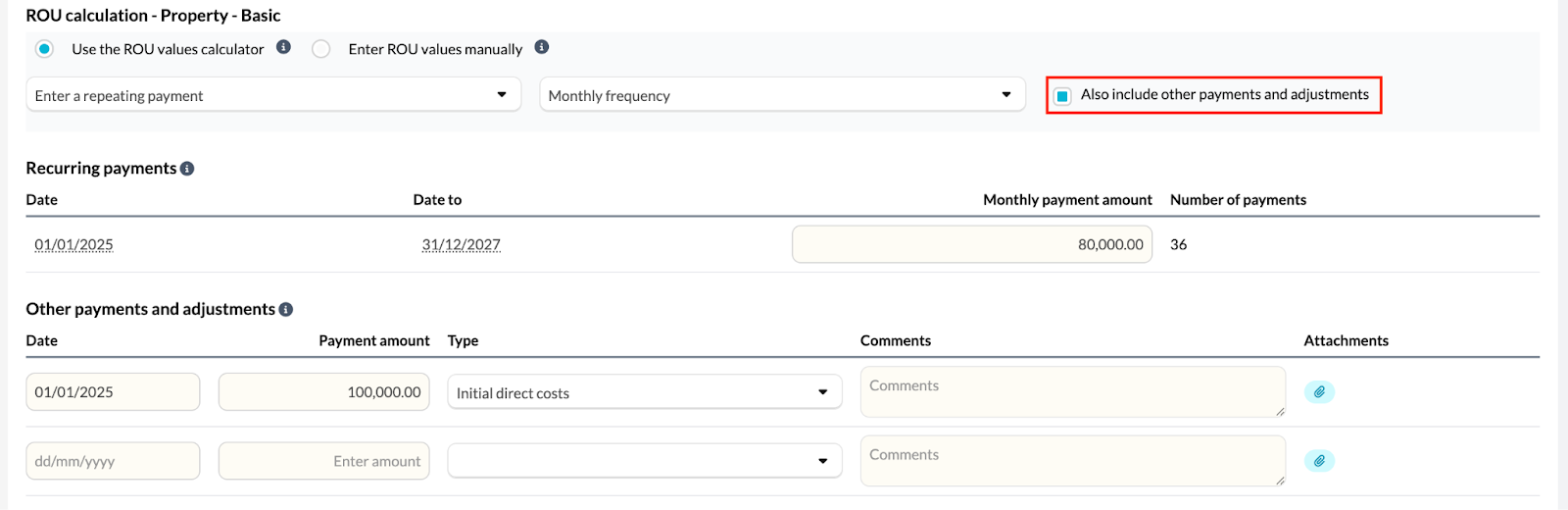
If one-off payments or adjustments are required, tick Also include other payments and adjustments. This will display the other payments and adjustments table, which you can fill out to record one-off transactions and categorise them by transaction type. There is also space for comments and attachments if supporting narrative or documentation is required to support the transaction.
Review calculated values
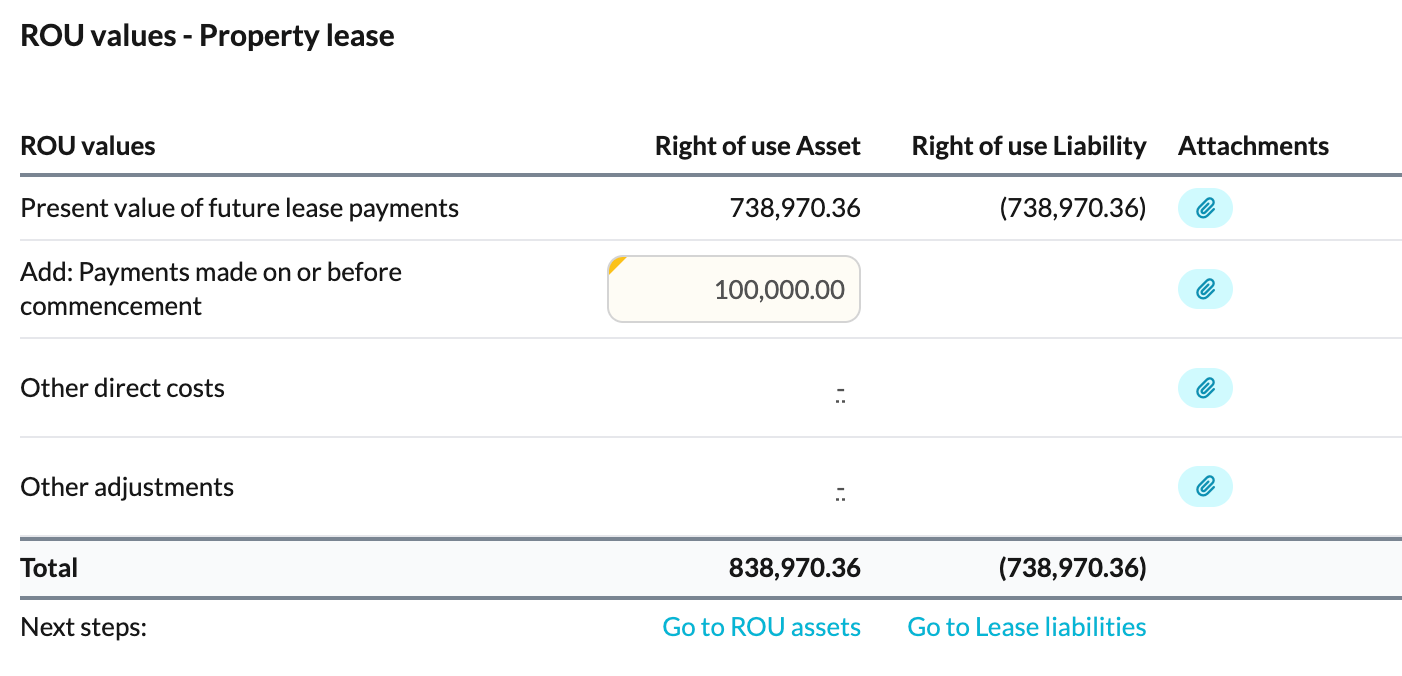
Once all information is input, the ROU values table will calculate the figures automatically, providing the right of use asset and right of use liability figures for recognition. One-off adjustments automatically feed through to the correct places under the ROU Asset heading, or they can be manually entered if needed to adjust the value of the ROU Asset to be recognised.
Present value & discounting logic
The software calculates the Net Present Value (NPV) of future lease payments by converting your annual discount rate into a monthly rate.
The "15th of the month" plotting rule
To determine the appropriate discount factor (n), the system uses a mid-month threshold to categorise payments as either Advance or Arrears:
- On or before the 15th (Advance): treated as a start-of-month payment. The cash flow is plotted at Month 0 (n=0) and is not discounted.
- On or after the 16th (Arrears): treated as an end-of-month payment. The cash flow is plotted at Month 1 (n=1) and is discounted for one full period.
Examples in practice
For a lease commencing 1 January:
- Payment on 10 January: before the 15th threshold. Plotted at Month 0 (no discount applied).
- Payment on 25 January: after the 15th threshold. Plotted at Month 1 (discounted for 1 month).
- Quarterly payment on 17 March: plotted at the end of Month 3 (n=3) because the 17th falls in the Arrears window.
Use journal suggestion
If you are satisfied with the calculated figures, tick Show ROU recognition journal. This proposes the journal to recognise the right of use asset and lease liability, with the relevant account codes, based on the data you provided.

Using manual ROU values entry (Option 2)
If you have already calculated your ROU values and simply want to record them, then the steps are as follows.
Input figures
Selecting the manual option removes the payment details tables and instead jumps to the ROU values table, which is now editable for you to enter your self-calculated present value of future lease payments. There is space for you to attach any workings or supporting documents to verify your manual figures.
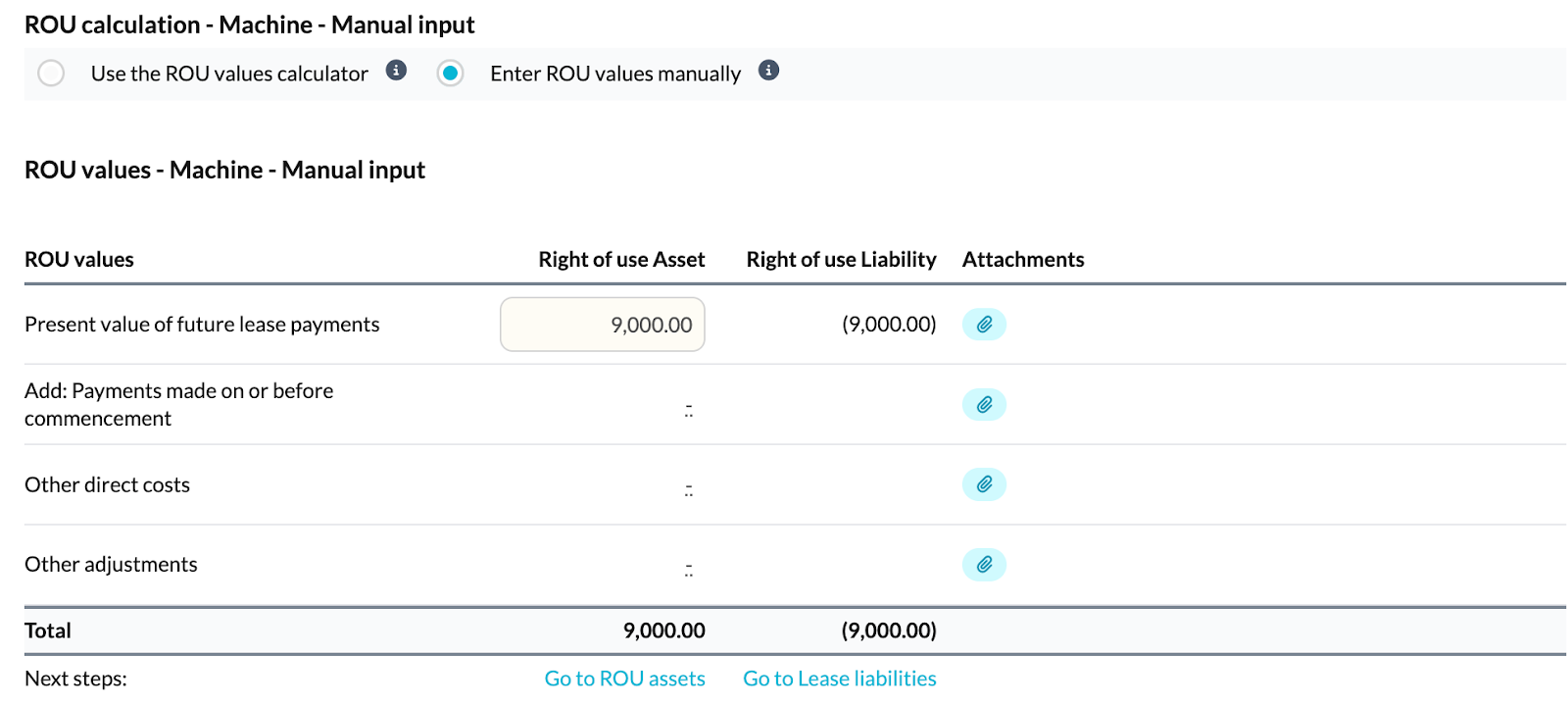
Whether you use the calculator or manual entry, these values will follow through to the ROU assets and Lease liabilities templates.
ROU assets reconciliation
For a full walkthrough, see How do I use the ROU assets template? (UK market).
- The ROU Assets template resembles a fixed asset register and focuses on calculating depreciation.
- The acquisition date, asset name, cost, lease term and supporting documents are automatically pulled through from the Leases Data template.
- The template will calculate the depreciation based on the method selected and over the lease term. The method (straight line or reducing balance), lease term and the calculated depreciation value itself can all be edited if required.
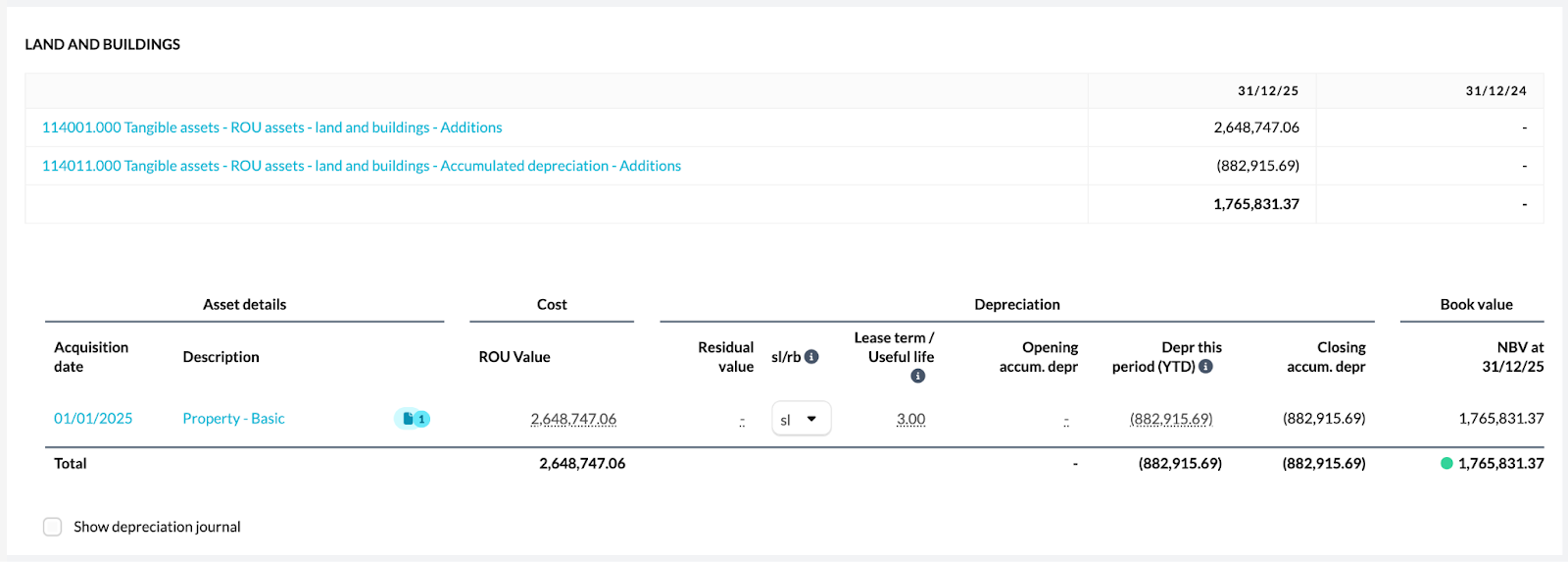
Similar to the fixed asset register template, the ROU Assets template offers a show depreciation journal feature, which suggests a journal in order to post an adjustment to record the depreciation calculated.
The right of use asset accounts in your trial balance are reconciled through this template using the Reconciled via ROU assets account template. See How do I use the Reconciled via ROU assets account template? (UK market).
Lease liabilities reconciliation
For a full walkthrough, see How do I use the Lease liabilities template? (UK market).
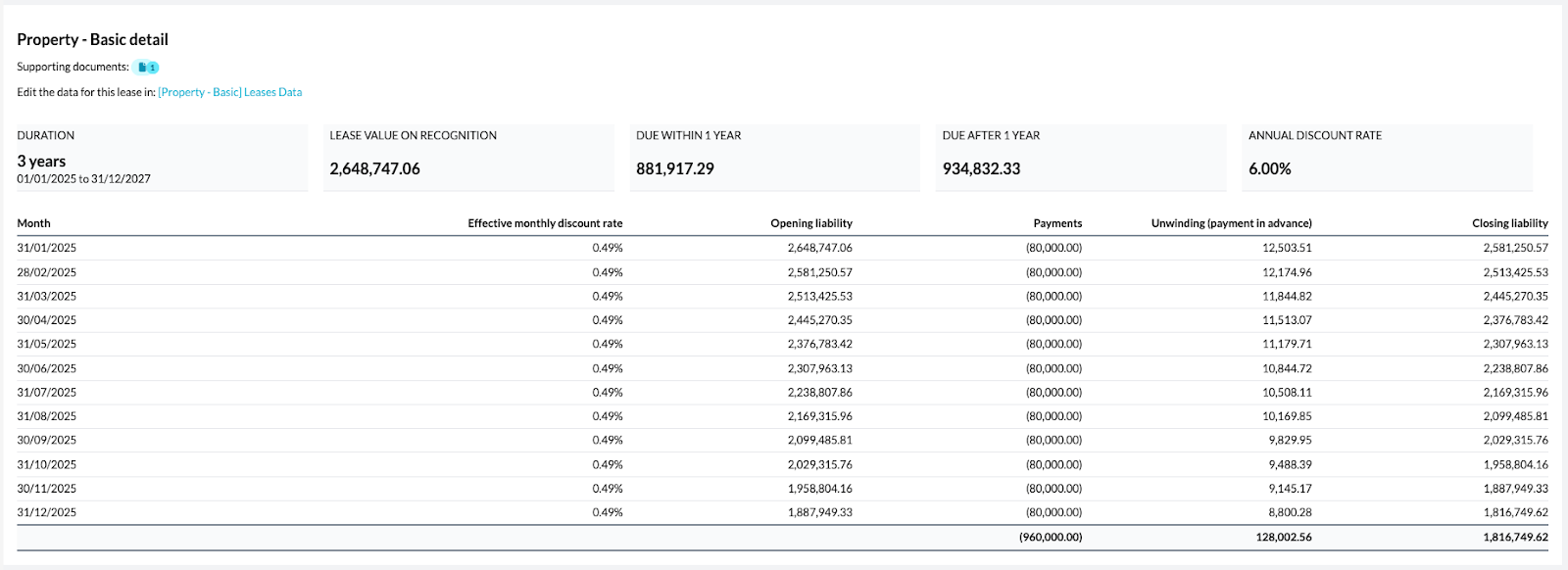
- The Lease Liabilities template is used to calculate the unwinding of interest and determine the closing liability.
- The lease name, opening liability, lease term, payment amounts, discount rate and supporting documents are automatically pulled through from the Leases Data template.
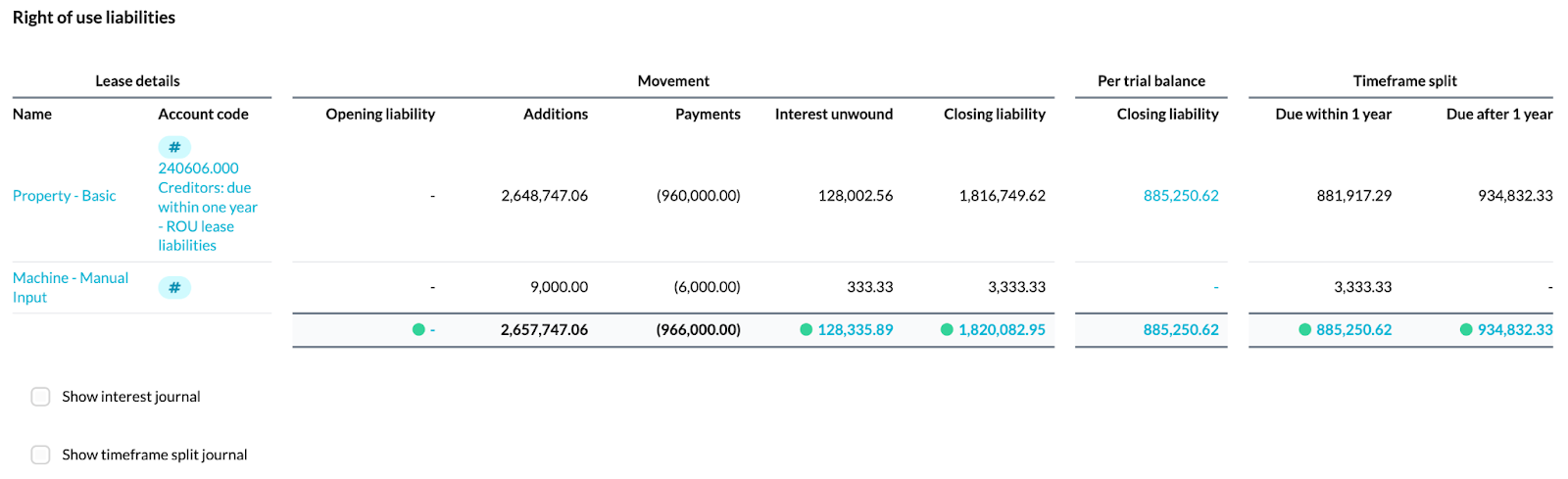
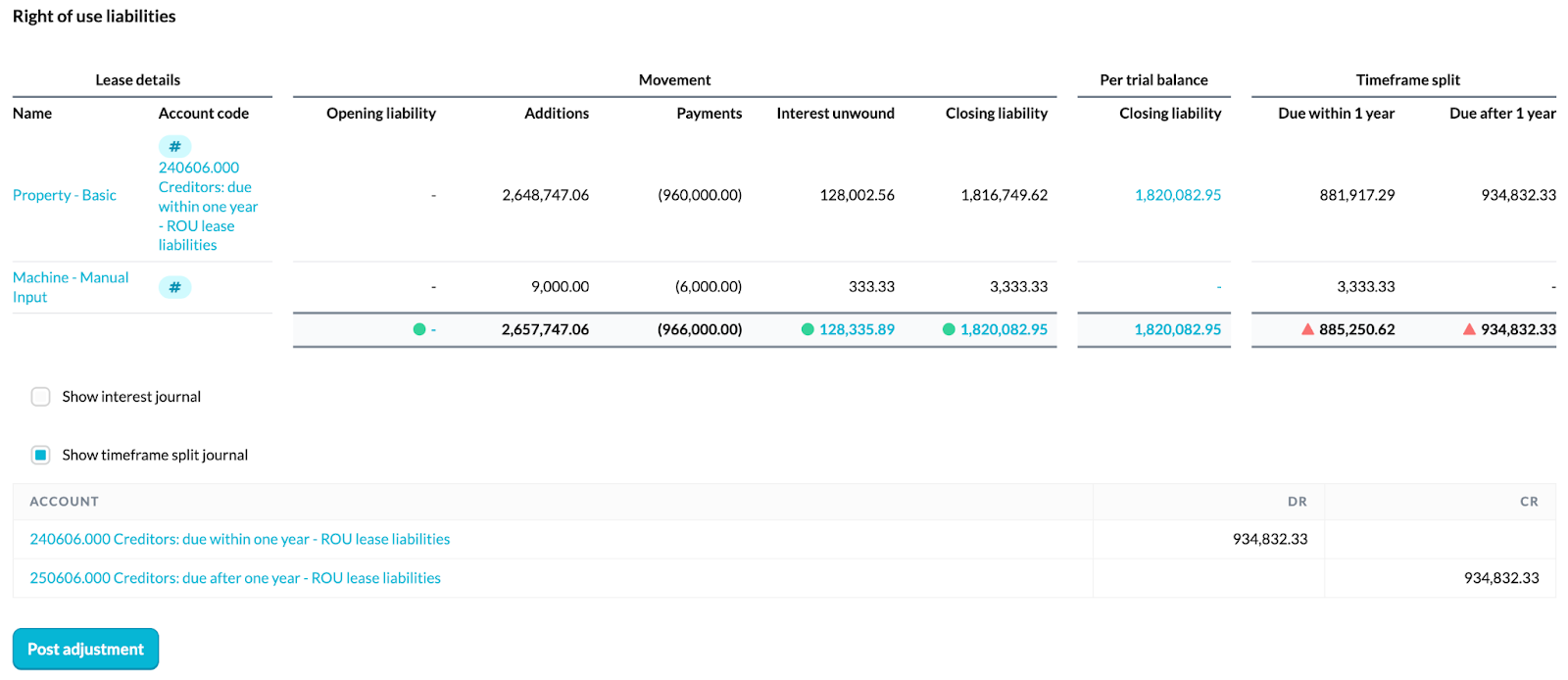
- The summary table at the top of the template summarises all of the individual leases below, showing the movement and how the closing liability is calculated through the payments and unwinding of interest in the period.
- Each lease has its own section where the template automatically calculates the unwinding of interest based on the discount rate and payments entered in the Leases Data template to arrive at the closing liability for the period. Headline figures for each lease are shown using tiles to pull out the important figures, and the monthly calculation detailing payments and interest unwinding for the period is visible below this.
Handle manual entries
If you chose the manual option in the Leases Data template, this template will show blank spaces since the necessary data to run the calculations is absent. Users must input the necessary data themselves and have the option to add an attachment for their workings.

Account code selector
In the summary table, use the account code selector to specify which account code has been used for that individual lease. This will pull through the account code balance into the Per trial balance column, allowing you to easily see whether the calculated closing balance per the template reconciles to what is shown in the trial balance.
Journal entries
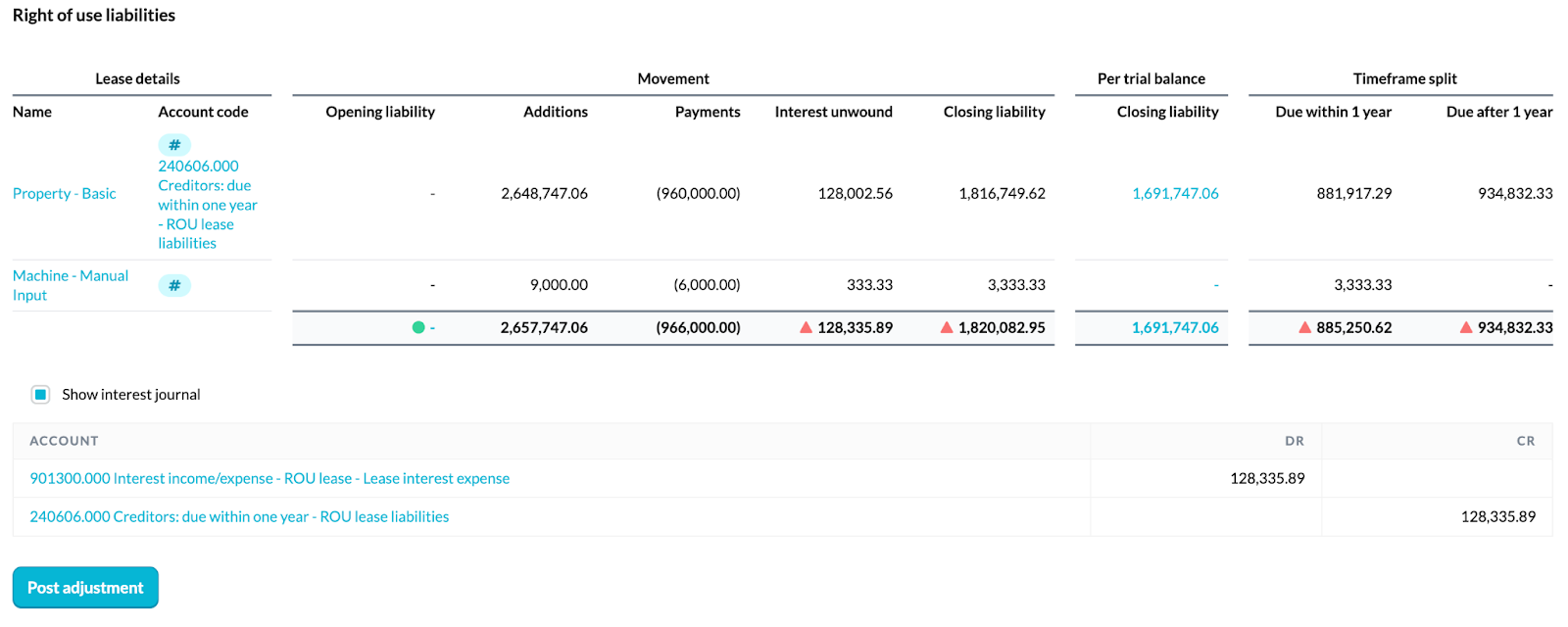
If your calculated closing balance does not reconcile to what the trial balance shows, you will need to post some adjustments. Use the proposed journals to reconcile the balances.
- First - tick Show interest journal below the summary table for Silverfin to suggest the relevant journal to post. This is based on the balance between the calculated interest figure in the summary table and the balance in 901300 Lease liabilities interest expense. Note: the other side of this journal defaults to the lease liability within 1 year, so it is important to post this journal before moving on to the timeframe split.
- Then - tick Show timeframe split journal to split the closing lease liability between within one year and after one year.
The lease liability accounts in your trial balance are reconciled through this template using the Reconciled via Lease liabilities account template. See How do I use the Reconciled via Lease liabilities account template? (UK Market).
Accounts
For accounting periods starting on or after 1 January 2026, the relevant new notes and updates will take place automatically. However, if you are looking to early adopt these amendments for earlier accounting periods, you will need to do the following. For the wider changes, see How do I navigate the 2024 FRS 102 Periodic Review (FRED 82)? (UK market).
- Access General Settings in the Accounts workflow.
- Scroll down until you locate the setting for Early adopt 2026 amendments and toggle this setting to yes.
Enabling the Early adopt 2026 amendments feature will result in three specific changes or additions within the accounts workflow.
Adding the new notes to your style
To make sure the new Right of use assets and Lease liabilities notes flow through to the PDF export, an admin user needs to add them to your firm's style. If this is not done, the notes can be completed in Silverfin but will not appear in the exported accounts by default.
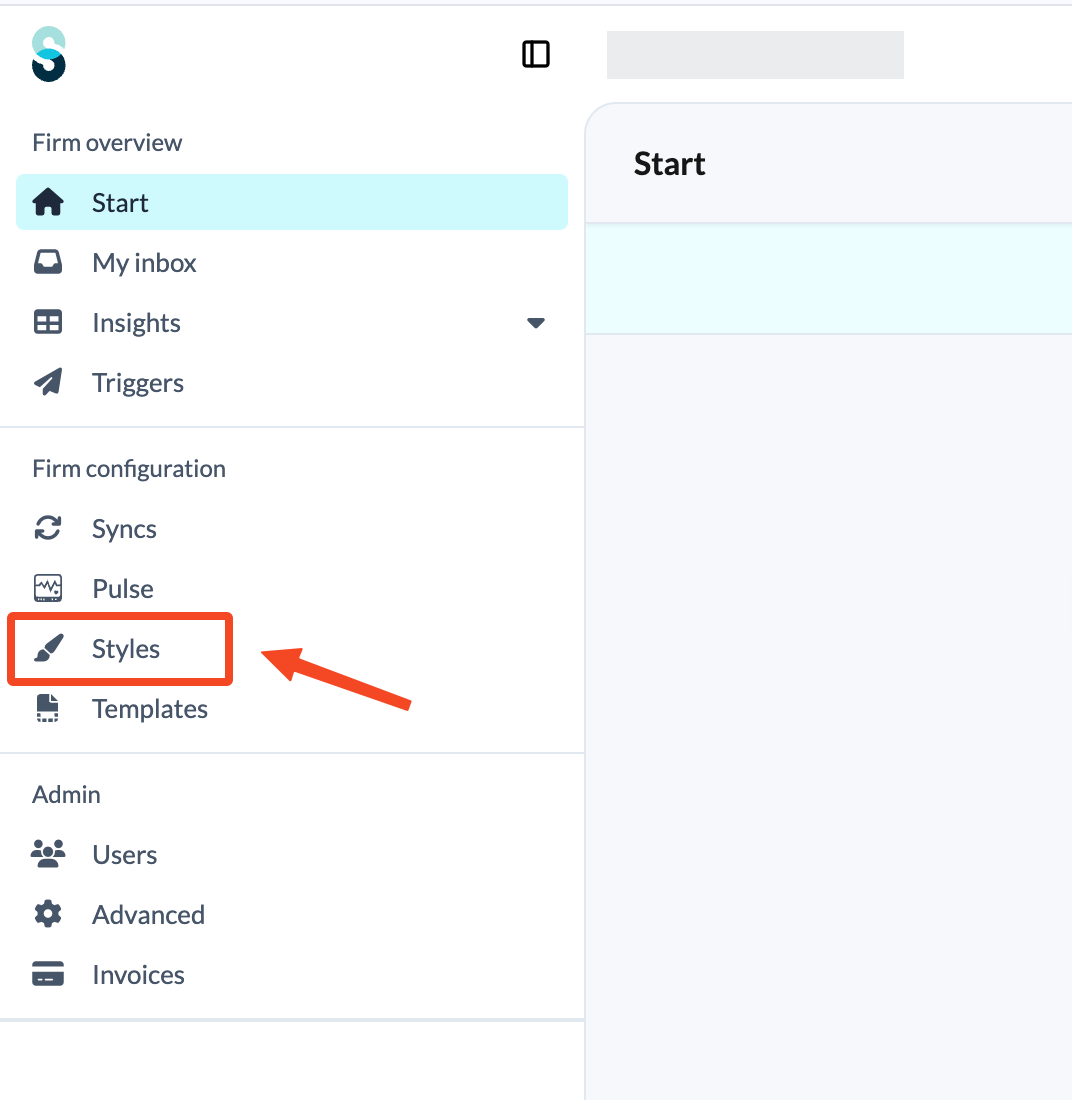
- An admin user will need to go to Styles.
- Open the style you use for these accounts, typically the FRS 102 Financial Statements style.
- In the Notes to the financial statements section, tick the boxes for Right of use assets and Lease liabilities.
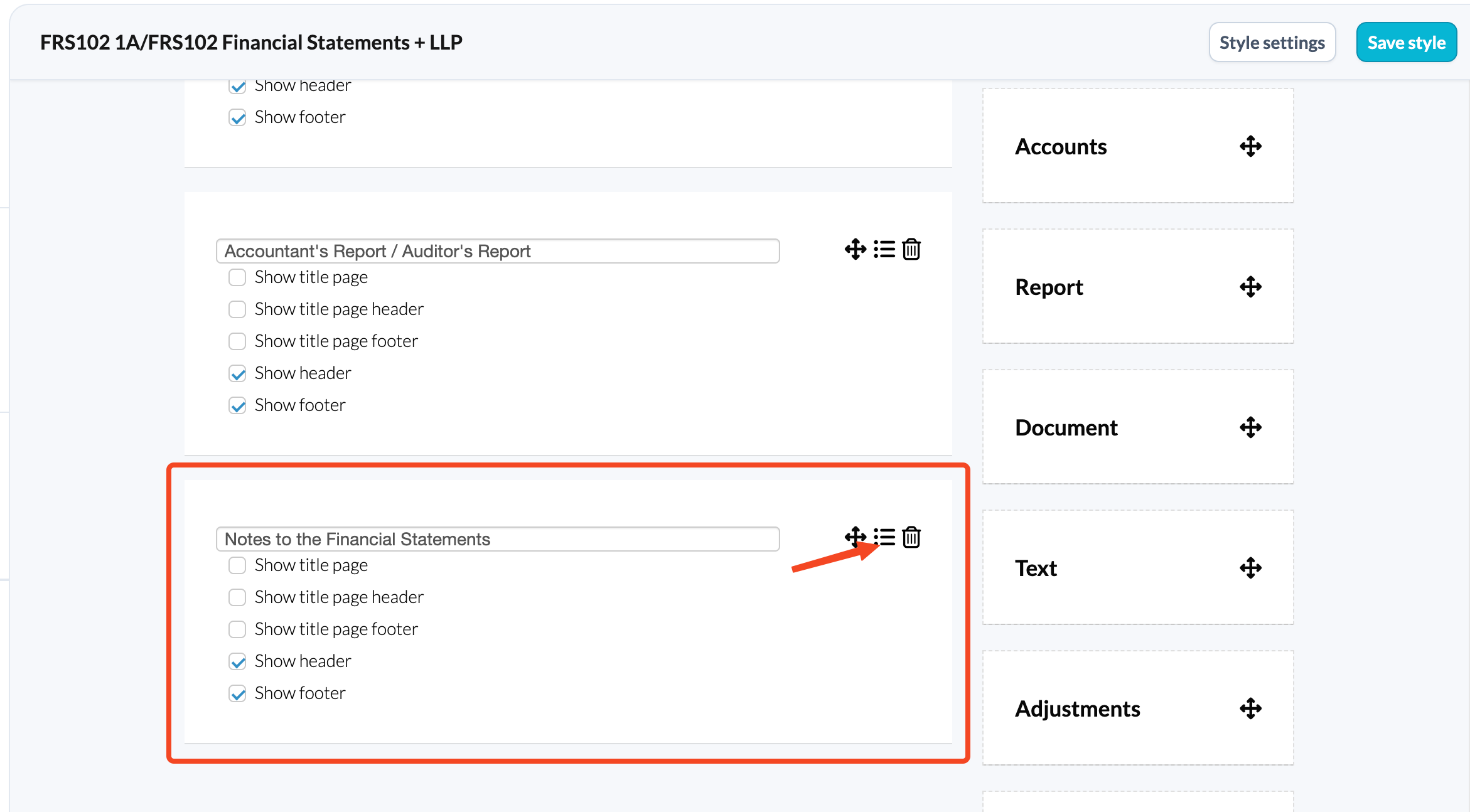
Repeat this for each style your firm uses for FRS 102 accounts, so that nothing gets missed.
Accounting policies
- If the account codes for ROU assets or lease liabilities have been used, then the new Right of use assets and lease liabilities accounting policy will be included as standard. It can otherwise be manually added by ticking the checkbox to include.
- This is standard wording that covers the relevant disclosures required, but it can be tweaked if necessary. Reach out to your CSM if you have any requests for your own firm's standard wording to be used instead of the Silverfin default.
- Note for the transitional year: in the transitional year, we have added some standard wording to the Changes in accounting policies section. This prompts for the relevant transitional disclosures required under the modified retrospective approach in relation to the opening balance adjustment made.
Right of use assets note
Purpose: this note is where you will capture and disclose the movement of any assets under the right of use.
- This note will appear and looks very similar to the tangible fixed assets note, so it should be very familiar.
- The number values in this note will pull through from the account mapping used in your trial balance, but can be manually typed in too if required.
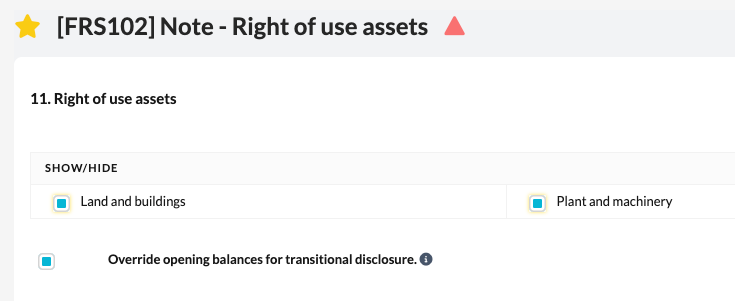
- Note for the transitional year: in the transitional year, there may be finance and operating leases that now need to be classified as right of use assets. Under the modified retrospective approach, there is no restatement of prior period figures, but instead an adjustment should be made to the opening balance. This means that in most cases you will already have an opening balance for your right of use assets, which may need manually typing in to the note. To be able to manually overtype these, make sure you tick the Override opening balances for transitional disclosure checkbox.
Lease liabilities note
Purpose: this note is to disclose all relevant required disclosures for the lease liabilities.
- This note shows the balances due within and after 1 year for lease liabilities, and the relevant balances for items not included in the lease liability balance, such as short leases, leases of low value and variable payments not included in the lease balance. Other optional areas can be added by ticking the checkbox for exempt lease commitments and sale and leaseback transactions.
- The number values in this note will pull through from the account mapping used in the trial balance, with the exception of the Total cash outflow for leases if relevant, and the Exempt lease commitments section, which will need to be typed in manually as there are no account codes for this area.
- Note for the transitional year: in the transitional year, it may be the case that the business had operating leases in the prior period which, as a result of the amendments, are now being treated as lease liabilities on the balance sheet. Through the modified retrospective approach, this is an adjustment to the opening balances. Make sure to tick the checkbox for Transitional period reconciliation, which enables you to reconcile between the closing balance of the operating lease commitments disclosed in the prior period accounts and the opening balance of the lease liabilities. There are some pre-defined rows, but they do not need to be used if they are not relevant. Additional rows can be added as necessary.
New account codes
| Section | Description | Account |
| Tangible assets | ROU assets - Land and buildings - Cost | 114000 |
| Tangible assets | ROU assets - Land and buildings - Additions | 114001 |
| Tangible assets | ROU assets - Land and buildings - Disposals | 114002 |
| Tangible assets | ROU assets - Land and buildings - Revaluation brought forward | 114003 |
| Tangible assets | ROU assets - Land and buildings - Revaluation movement | 114004 |
| Tangible assets | ROU assets - Land and buildings - Transfers | 114005 |
| Tangible assets | ROU assets - Land and buildings - Accumulated depreciation | 114010 |
| Tangible assets | ROU assets - Land and buildings - Accumulated depreciation - Additions | 114011 |
| Tangible assets | ROU assets - Land and buildings - Accumulated depreciation - Disposals | 114012 |
| Tangible assets | ROU assets - Land and buildings - Accumulated depreciation - Impairment brought forward | 114013 |
| Tangible assets | ROU assets - Land and buildings - Accumulated depreciation - Impairment movement | 114014 |
| Tangible assets | ROU assets - Land and buildings - Accumulated depreciation - Other movements | 114015 |
| Tangible assets | ROU assets - Plant and machinery - Cost | 114020 |
| Tangible assets | ROU assets - Plant and machinery - Additions | 114021 |
| Tangible assets | ROU assets - Plant and machinery - Disposals | 114022 |
| Tangible assets | ROU assets - Plant and machinery - Revaluation brought forward | 114023 |
| Tangible assets | ROU assets - Plant and machinery - Revaluation movement | 114024 |
| Tangible assets | ROU assets - Plant and machinery - Transfers | 114025 |
| Tangible assets | ROU assets - Plant and machinery - Accumulated depreciation | 114030 |
| Tangible assets | ROU assets - Plant and machinery - Accumulated depreciation - Additions | 114031 |
| Tangible assets | ROU assets - Plant and machinery - Accumulated depreciation - Disposals | 114032 |
| Tangible assets | ROU assets - Plant and machinery - Accumulated depreciation - Impairment brought forward | 114033 |
| Tangible assets | ROU assets - Plant and machinery - Accumulated depreciation - Impairment movement | 114034 |
| Tangible assets | ROU assets - Plant and machinery - Accumulated depreciation - Other movements | 114035 |
| Tangible assets | ROU assets - Motor vehicles - Cost | 114040 |
| Tangible assets | ROU assets - Motor vehicles - Additions | 114041 |
| Tangible assets | ROU assets - Motor vehicles - Disposals | 114042 |
| Tangible assets | ROU assets - Motor vehicles - Revaluation brought forward | 114043 |
| Tangible assets | ROU assets - Motor vehicles - Revaluation movement | 114044 |
| Tangible assets | ROU assets - Motor vehicles - Transfers | 114045 |
| Tangible assets | ROU assets - Motor vehicles - Accumulated depreciation | 114050 |
| Tangible assets | ROU assets - Motor vehicles - Accumulated depreciation - Additions | 114051 |
| Tangible assets | ROU assets - Motor vehicles - Accumulated depreciation - Disposals | 114052 |
| Tangible assets | ROU assets - Motor vehicles - Accumulated depreciation - Impairment brought forward | 114053 |
| Tangible assets | ROU assets - Motor vehicles - Accumulated depreciation - Impairment movement | 114054 |
| Tangible assets | ROU assets - Motor vehicles - Accumulated depreciation - Other movements | 114055 |
| Creditors: due within one year | Lease liabilities | 240606 |
| Creditors: due after one year | Lease liabilities | 250606 |
| Cost of sales | Depreciation of right of use assets | 520320 |
| Cost of sales | Short term lease expense | 520900 |
| Cost of sales | Low value assets lease expense | 520901 |
| Cost of sales | Variable lease payments | 520902 |
| Cost of sales | Gains/losses from sale and leaseback | 520930 |
| Administrative expenses | Depreciation of right of use assets | 720320 |
| Administrative expenses | Short term lease expense | 720500 |
| Administrative expenses | Low value assets lease expense | 720501 |
| Administrative expenses | Variable lease payments | 720502 |
| Administrative expenses | Gains/losses from sale and leaseback | 720530 |
| Other operating income/expense | Income from sub-leasing of right of use assets | 900009 |
| Interest income/expense | Lease liabilities interest expense | 901300 |