
| User Roles |  Admin Admin |  Staff contributor Staff contributor | ✗External contributor | ✗Pulse user |
The VAT closing balance reconciliation reconciles the VAT control account balance carried in the trial balance at the period end to the amounts declared on the VAT returns covering the period. This article explains when to use the template, how to complete the return schedule, and how the reconciliation to the trial balance works. It is relevant for UK teams supporting a VAT control account balance in the Working Papers workflow.
Table of contents
- When should I use this template?
- What do I need before I start?
- What does this template do?
- How do I select the VAT scheme?
- How do I select the filing frequency and number of periods?
- How do I complete the VAT return schedule?
- How do I reconcile to the trial balance?
- How do I star the template?
- What flows through to the rest of the accounts?
- What rolls forward next year?
- Where does the data come from?
- Frequently asked questions
When should I use this template?
- Use the VAT closing balance reconciliation wherever the company is VAT-registered and carries a VAT control account balance on the balance sheet that needs to be supported and reconciled at the year end.
- A debtor or creditor balance can exist at the year end simply because the timing of the accounting entries doesn't line up exactly with when a VAT return is filed or paid.
- This template lists each VAT return period, builds up the closing balance implied by those returns, and compares it to the mapped VAT nominal code balance(s), flagging any unreconciled difference.
- It is the current working paper for this purpose in UK Working Papers workflows. The template's own auto-hide logic shows it is only active for periods ending on or after 31 March 2021 (before that date the workflow only ever used the older Summary of VAT returns - BS rec template), and it stays hidden for periods ending before 4 January 2022 if Summary of VAT returns - BS rec is starred, so that files already reconciled on the old template aren't disrupted. In practice: on a new file, use this template; on an established file still starred on Summary of VAT returns - BS rec, that one continues to apply until you choose to switch.
What do I need before I start?
- Confirm the relevant Working Papers workflow is added to the file — this template is included in the standard limited, unincorporated, farming and medical Working Papers workflows (and the Mercia non-audit variants).
- Know the company's VAT registration details: which scheme it uses (standard/accrual, cash accounting, flat rate or annual) and how often it files (monthly, bi-monthly, quarterly or yearly) — you'll select both on the template.
- Check the nominal code(s) that hold the VAT control account balance. The template defaults to account range 250502, 240502, 150502, 140502, 140510; if the client's chart of accounts uses different codes, you'll override this on the template itself.
- Only one of VAT closing balance reconciliation and Summary of VAT returns - BS rec should be starred at a time — check which is currently starred before you begin, since starring one is what makes it (rather than the other) feed the rest of the VAT templates.
What does this template do?
The VAT actually declared on returns can differ in timing from the VAT recognised in the ledger — most commonly under the cash accounting scheme, where output and input tax are accounted for by reference to cash received and paid rather than invoice dates — so the accounting control account balance and the amount outstanding per the VAT returns won't always be identical at a point in time. This template exists to demonstrate that reconciliation and to isolate and explain any genuine difference, rather than leaving the balance sheet figure unsupported.
Step 1: How do I select the VAT scheme?
At the top of the template, select the VAT scheme the company uses: Flat rate scheme, Cash accounting scheme, Accrual scheme, Annual scheme, or Other (which reveals a free-text box to describe the scheme). This choice matters because selecting Cash accounting scheme changes the reconciliation section further down the template (see the reconciliation step) to include the cash-accounting timing adjustments needed to tie the return figures back to the accruals-basis ledger balance. The scheme selected here is also read directly by the VAT turnover reconciliation template, which adjusts its own logic when cash accounting applies.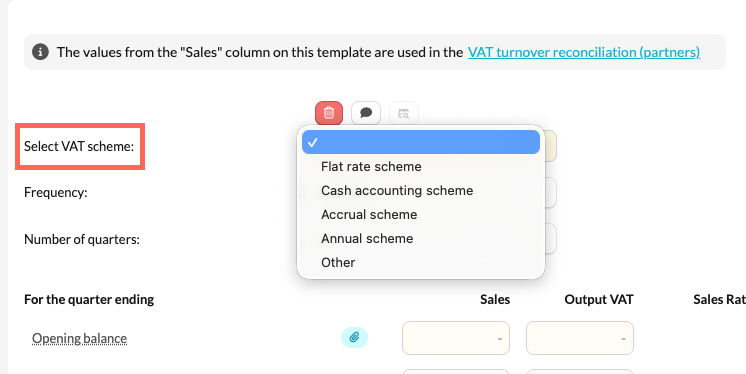
Step 2: How do I select the filing frequency and number of periods?
Select the Frequency: Monthly, Bi-monthly, Quarterly or Yearly (defaults to quarterly). This determines whether the return schedule below is built up by month, alternating month (bi-monthly filers only file every other month), quarter or single year, and it drives the period labels (e.g. "Q1 (January 25 - March 25)"), which are generated automatically from the period's month-end dates.
If Quarterly is selected, a further Number of quarters dropdown appears (1 to 10, defaulting to 4) so you can show more than a single year's worth of quarters where useful — for example, a short first accounting period, or to carry additional quarters into the following year.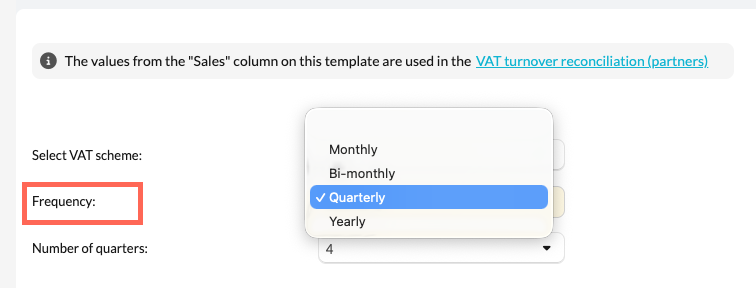
Step 3: How do I complete the VAT return schedule?
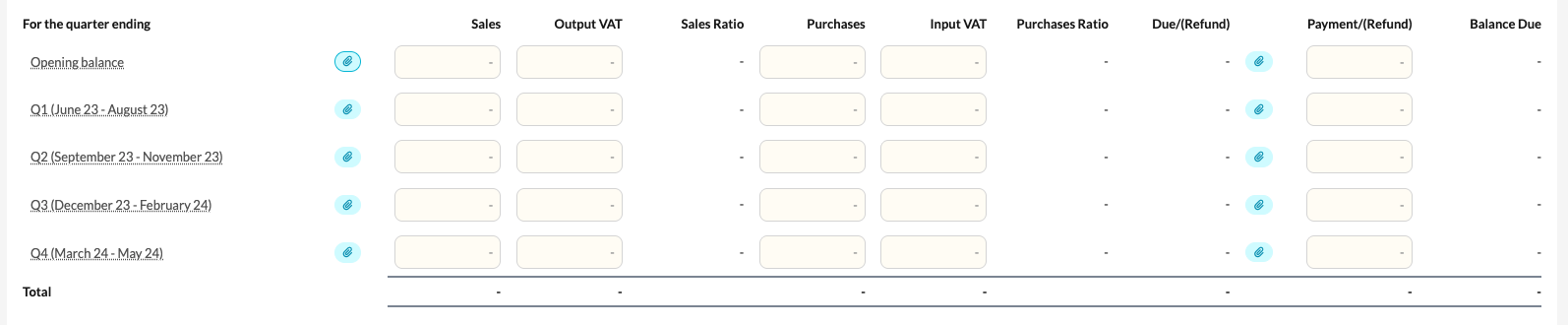
An opening balance row is provided first (defaulting to the description "Opening balance"), followed by one row per period (month, quarter or year, depending on the frequency selected). For each row you can attach supporting evidence and enter, from the VAT return for that period:
- Sales and Output VAT
- Purchases and Input VAT
- Payment/(Refund), with its own attachment for evidence of the payment or refund
From these entries the template automatically calculates, for each row:
- Sales Ratio and Purchases Ratio — output VAT as a proportion of sales, and input VAT as a proportion of purchases, shown as a percentage (useful as a sense-check that the VAT rate applied looks reasonable).
- Due/(Refund) — Output VAT less Input VAT for the period.
- Balance Due — a running total of Due/(Refund) less Payment/(Refund), carried down row by row.
None of these opening or period figures roll forward automatically from the prior year — the opening balance and each period's figures are entered (or re-imported) fresh for the current file, though the row structure and labelling adjust themselves each year based on the period dates and your scheme and frequency selections.
Step 4: How do I reconcile to the trial balance?
Below the return schedule, choose the VAT nominal codes that make up the VAT control account — this defaults to the account range above but can be changed to match the client's chart of accounts. The template lists the balance on each selected account and totals them as "Balance per bookkeeping".
You can then add:
- A single named adjustment (only shown once you enter a value), plus any number of further adjustment rows, to reach "Balance per accounts" — use this for known reconciling postings between the raw account balance and the true accounting position.

- If Cash accounting scheme was selected, two additional required fields: Closing VAT on debtors and Closing VAT on creditors — these capture VAT embedded in year-end trade debtors and creditors that has not yet passed through a cash-basis VAT return, and are needed because cash accounting recognises VAT on cash movements rather than on the accruals-basis debtor/creditor balances sitting in the accounts.
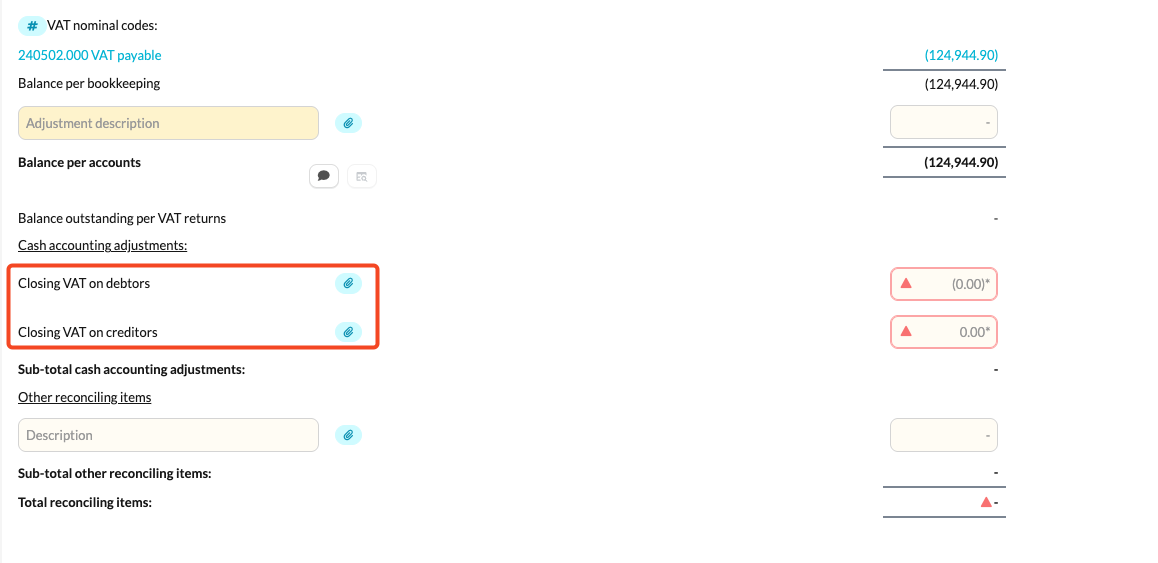
- Any number of reconciling items (description and amount) to true up remaining timing or posting differences between the accounts and the returns.
The template then compares "Balance per accounts" against the return-based closing balance ("Balance outstanding per VAT returns", taken from the running Balance Due total in the return schedule) adjusted for the cash accounting and reconciling items entered. Where a difference remains, an unreconciled indicator is shown alongside a breakdown (balance per accounts, closing VAT return, and the difference), so you can trace and clear it before finalising — for example by checking the nominal codes selected, unposted adjustments, or whether a cash accounting adjustment has been missed.
Step 5: How do I star the template?
Star this reconciliation once you're using it (rather than Summary of VAT returns - BS rec) so its results feed the other VAT templates. If both templates are starred at once, a warning appears asking you to star one only. If neither is starred, or if this one isn't starred, an on-screen prompt reminds you that starring is what makes it feed the VAT turnover reconciliation and the VAT account reconciliation.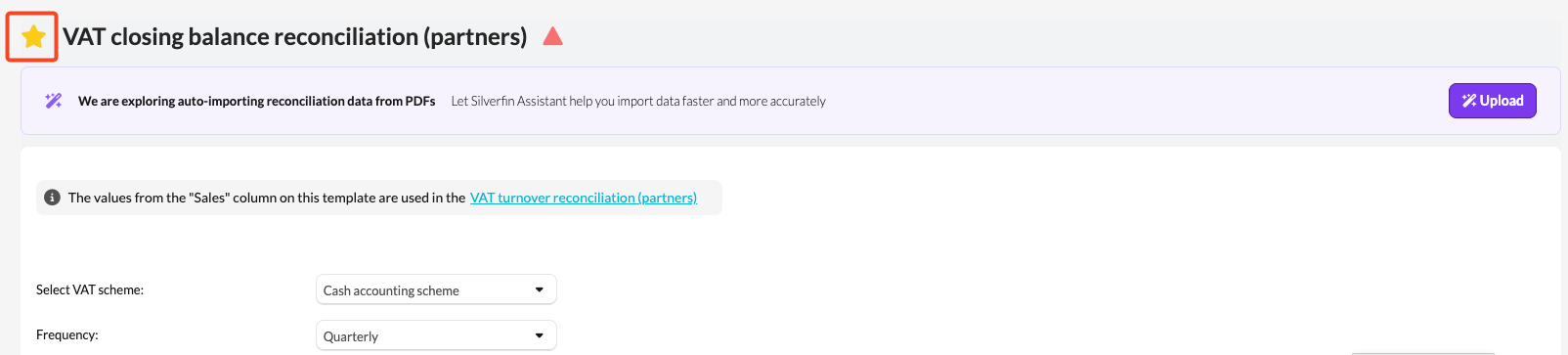
What flows through to the rest of the accounts?
- VAT account reconciliation (account template): when this template is starred, its selected VAT nominal codes and its overall reconciliation difference are read directly by the VAT account reconciliation template attached to the actual ledger account(s), so the account itself shows a reconciled/unreconciled indicator and a link back here. If Summary of VAT returns - BS rec is starred instead, the account template reads from that one instead.
- VAT turnover reconciliation: reads this template's frequency, period labels, per-period Sales figures, and VAT scheme (in particular whether cash accounting applies) to build its own turnover-to-output-VAT reconciliation over the same periods.
- Together, this supports the VAT creditor or debtor figure presented in the balance sheet (within "creditors: taxation and social security" or the debtors note, depending on the company's position) and its accompanying notes.
What rolls forward next year?
Nothing on the template carries a value forward automatically — the opening balance and every period's return figures, adjustments and reconciling items are re-entered (or re-imported) each year. What does carry forward without extra work is the structure: your VAT scheme, frequency and nominal code selections remain as configured unless changed, and the period labels for the new year's quarters/months are regenerated automatically from the period dates.
Where does the data come from?
- VAT control account balance: the mapped nominal code(s) selected under "VAT nominal codes" in the trial balance (default range 250502, 240502, 150502, 140502, 140510).
- VAT return figures (sales, purchases, output/input VAT, payments/refunds): entered manually per period from the VAT returns filed with HMRC, evidenced by the attachment fields provided.
- Adjustments, cash accounting adjustments and reconciling items: entered manually to explain any difference between the accounts and the returns.
- Company settings: the file's period dates and month-end dates drive the automatic quarter/month labelling; the currency setting drives formatting.
Frequently asked questions
What's the difference between this template and "Summary of VAT returns - BS rec"?
They cover the same ground and are mutually exclusive — only star one. This template (VAT closing balance reconciliation) is the current version used from periods ending 31 March 2021 onward; older files may still be starred on the Summary of VAT returns template.
What's the difference between this template and the "VAT turnover reconciliation" template?
This template reconciles the balance sheet VAT control account position. The VAT turnover reconciliation reconciles turnover/output VAT to the profit and loss account, and actually pulls its period structure and Sales figures from whichever of this template or Summary of VAT returns is starred.
Why does selecting "Cash accounting scheme" change the template?
Under cash accounting, VAT is accounted for on cash received and paid rather than on invoice/tax point dates, so the accruals-basis ledger balance and the cash-basis return figures can differ by the VAT embedded in year-end debtors and creditors. Selecting this scheme reveals required fields to capture those two adjustments so the reconciliation ties out.
Why is my template showing as unreconciled?
"Balance per accounts" and the adjusted closing VAT return total don't agree. Check that the correct nominal codes are selected, that all adjustments and (if applicable) cash accounting adjustments have been entered, and that the reconciling items fully explain any remaining difference.
Do I need to star this template?
Only if you want it (rather than Summary of VAT returns - BS rec) to feed the VAT turnover reconciliation and the VAT account reconciliation. The template can still be marked reconciled without data or without being starred — it doesn't have to be starred to complete the file.