
| User Roles |  Admin Admin |  Staff contributor Staff contributor | ✗External contributor | ✗Pulse user |
The account template is used on the bad debts expense nominal account(s) to record and reconcile the provision for doubtful debts. The nominal accounts it is assigned to are set in your firm's mapping, so check which accounts it applies to in your own environment rather than relying on a fixed code.
Table of contents
Completing the template
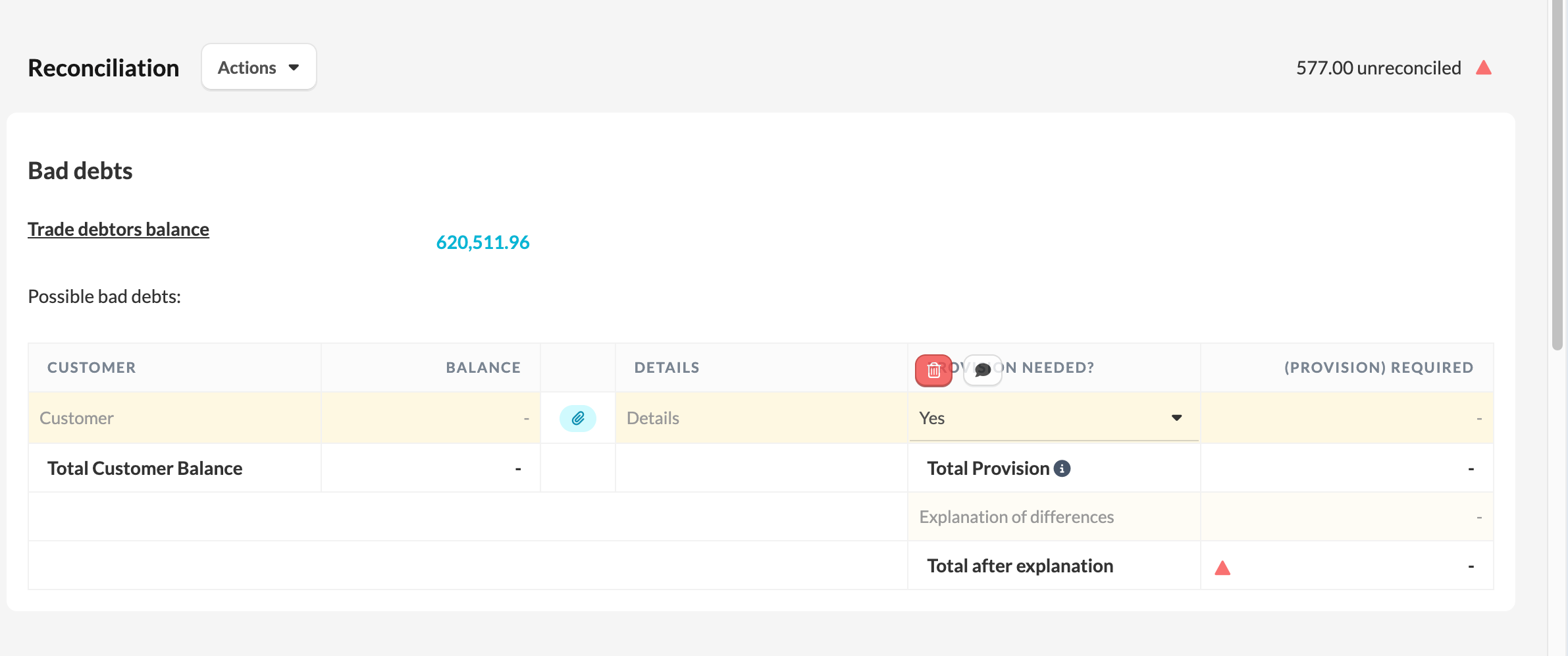
At the top of the template, the Trade debtors balance is auto-populated from the nominal accounts mapped to trade debtors. Below it, you list the possible bad debts.
The template has the following fields:
- Trade debtors balance – auto-populated from the trade debtors nominal accounts.
- Customer – the name of the customer expected to have a bad debt.
- Balance – the amount owed by that customer.
- Details – details of the possible bad debt. You can also attach a supporting file on each line here.
- Provision needed? – a Yes / No dropdown, which defaults to Yes.
- (Provision) required – the value of the customer debt provided for. Only enter this when Provision needed? is set to Yes; if it is set to No, the required provision shows as 0.
Reconciling the provision
The template totals the Total Customer Balance and the Total Provision, and reconciles the total provision against the nominal code value.
Where there is a difference, an Explanation of differences section appears. Enter your explanatory line items here, each with a note and an amount. The red or green reconciliation dot reflects the difference remaining after these explanations.
Importing existing data
If you already hold this data elsewhere, you can import it instead of typing it in:
- Click Actions → Import reconciliation data.
- Select Upload Excel file and map your column headers to the fields available in Silverfin.
For more detail, read How to import reconciliation data to explain an account?