
| User Roles |  Admin Admin |  Staff contributor Staff contributor |  External contributor External contributor | ✗ Pulse user |
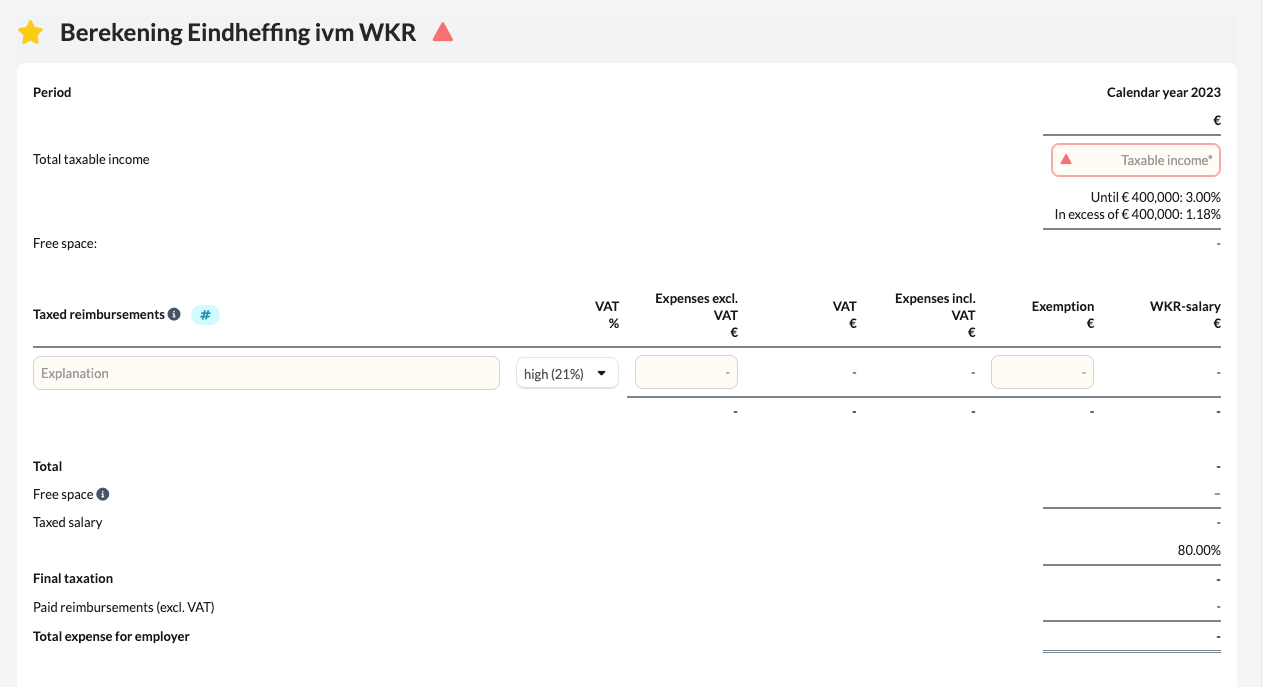
In this article you will learn how to use the 'Berekening eindheffing i.v.m. WKR' template within the working papers. This template automatically calculates the final levy based on the Work-Related Costs Scheme (WKR), using the fiscal wage and the specified reimbursements as inputs.
Table of contents
- What does the 'Berekening eindheffing i.v.m. WKR' template do?
- What should you keep in mind when using this template?
What does the 'Berekening eindheffing i.v.m. WKR' template do?
When the fiscal wage is read or imported (for example from Nmbrs), this calculation is automatically activated. The template helps determine whether the reimbursements and provisions fall within the discretionary margin of the WKR, or whether a final levy applies.
How do you fill in the template?
- In the 'Taxed reimbursements' section, select the general ledger accounts that apply. Use the correct hashtags (#) to link the relevant accounts.
- You can also manually enter amounts that fall under the WKR, if they are not retrieved automatically.
- The system then calculates the total taxable reimbursements and compares these with the permitted discretionary margin
What should you keep in mind when using this template?
- When the balance of the reimbursements exceeds the discretionary margin, a red triangle will appear in the template.
- In that case, you must confirm that you have noted this and provide an explanation or clarification in the template.
- Always verify that all relevant general ledger accounts have been included to ensure the calculation is complete.
By performing this check in a timely manner, you can avoid unexpected tax liabilities at the end of the year and ensure that the notes on payroll tax in the financial statements are complete and accurate.