
| User roles |  Admin Admin |  Staff contributor Staff contributor |  External contributor External contributor | ✗ Pulse user |
In this article, you will learn how to use the ‘Cash and cash equivalents check’ template within the working papers.
This template provides an overview of all bank accounts held by the company and helps you to manually verify and explain the balances.
Table of contents
- What does the ‘Cash and cash equivalents check’ template do?
- How do you use the template in practice?
- Can I also include cash in this template?
What does the ‘Cash and cash equivalents check’ template do?
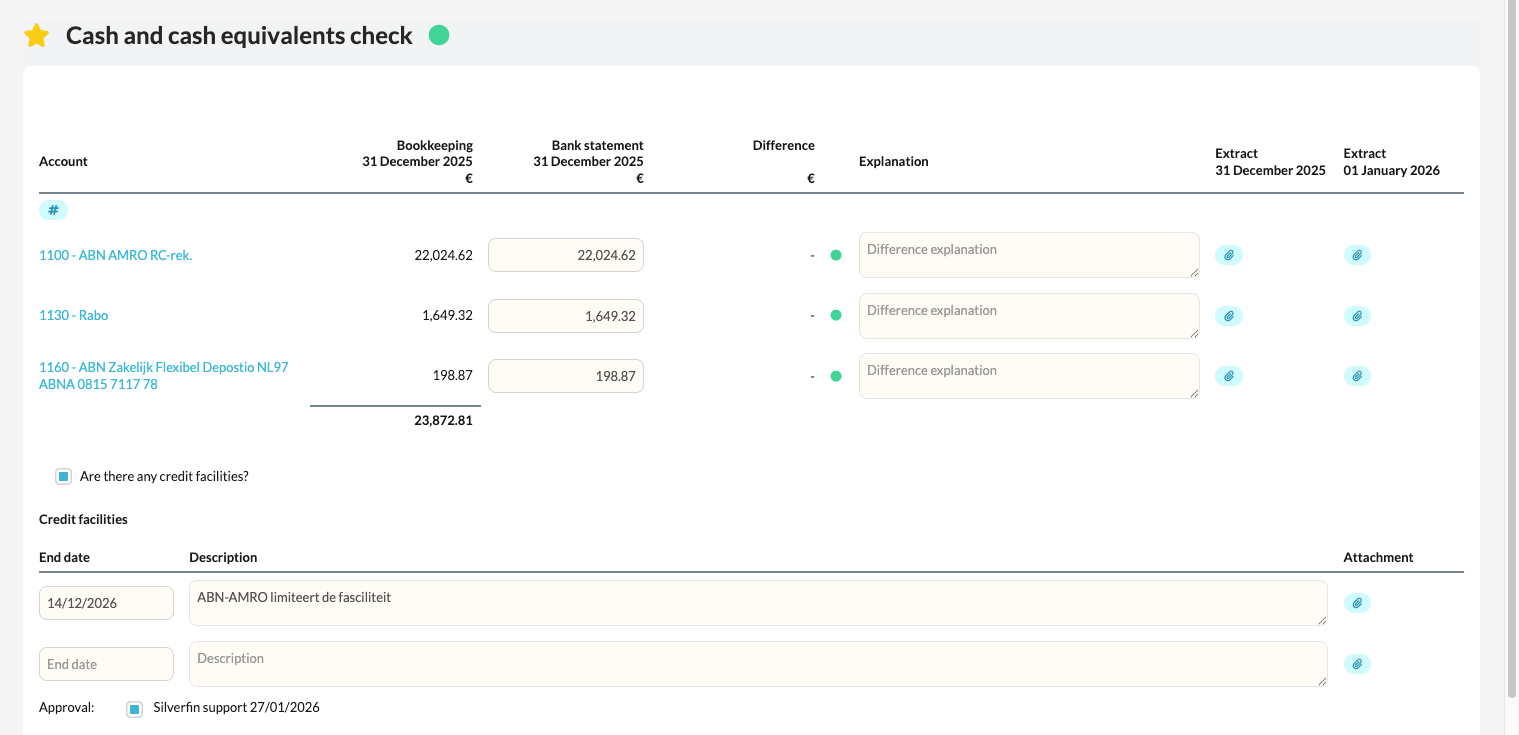
The template provides a complete overview of all bank accounts included in the administration.
For each account, you can:
- enter the verified balance,
- and, if there is a difference with the accounting balance, add an explanation or comment.
This gives you a clear overview of all cash flows and any discrepancies per bank account.
How do you use the template in practice?
- Review the list of bank accounts displayed in the template.
- Enter the verified balance for each account (as confirmed by bank statements or a bank connection).
- If there is a difference with the balance in Silverfin, add an explanatory note to the relevant account.
- Where relevant, attach supporting documents for the review (e.g. a bank statement or reconciliation overview).
Can I also include cash in this template?
Yes, this is possible.
If you would like cash accounts to also appear in this template, this can be configured at firm level.
Please contact your Customer Success Manager to activate this option.