
| User Roles |  Admin Admin |  Staff contributor Staff contributor |  External contributor External contributor | ✗ Pulse user |
In this article you will learn how to use the 'Participations' template within the working papers.
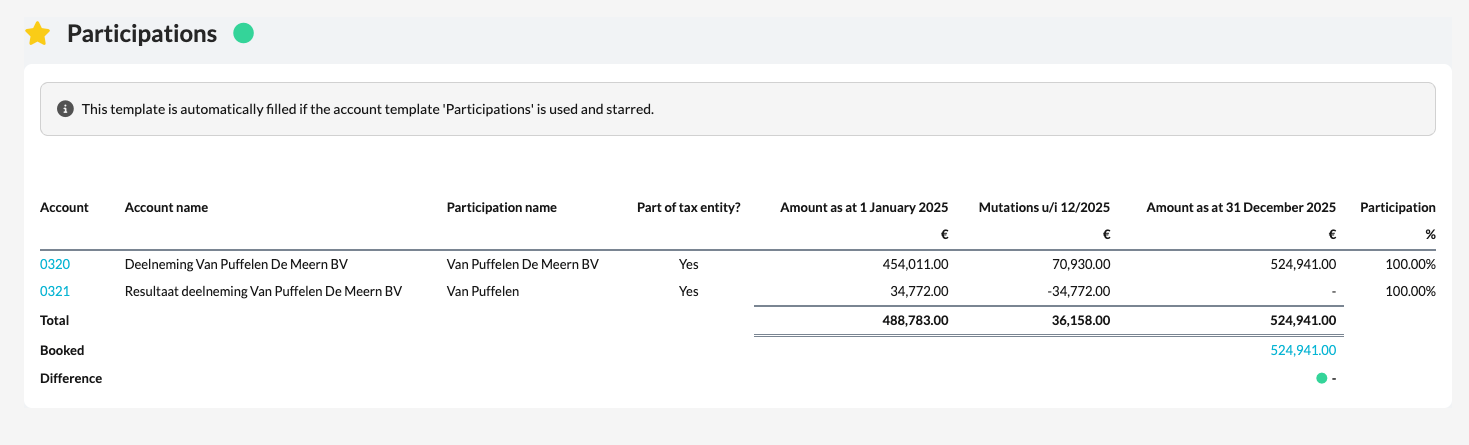
This template provides a complete overview of the participations included in the bookkeeping and checks whether the amounts have been processed correctly.
➡️ This template is specifically intended for files within the Dutch market.
Table of contents
What does the 'Participations' template do?
- The template automatically collects all amounts entered in the active (starred) account templates linked to the participation accounts.
- This creates one clear overview of all companies in which participations are held, including the corresponding values and notes.
How does the check in this template work?
- The template checks whether the total balance of participations matches the balance recorded in the bookkeeping.
- You will find this check on the 'Booked' line, which lets you immediately see whether there are any differences between the entered data and the bookkeeping.