
| User Roles |  Admin Admin |  Staff contributor Staff contributor |  External contributor External contributor | ✗ Pulse user |
In this article you will learn how to use the 'Construction contracts check' template within the working papers.
The template helps you check the financial position of ongoing projects and ensures a clean reconciliation with the booked amounts in the bookkeeping.
Table of contents
What does the 'Construction contracts check' template do?
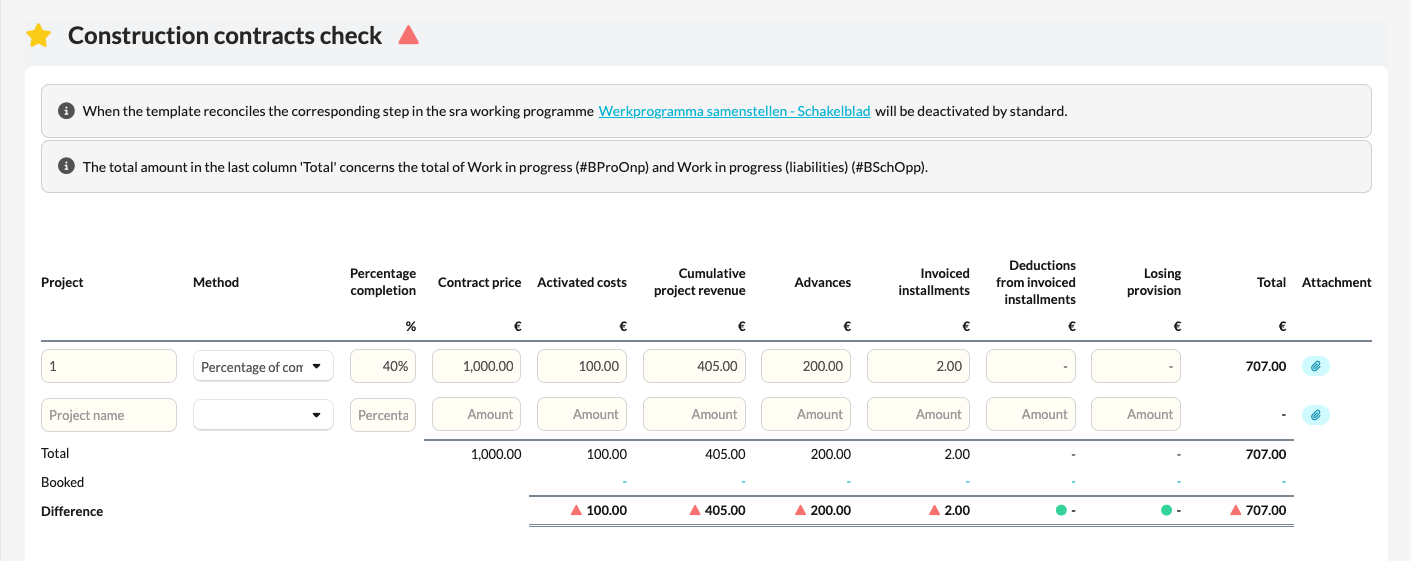
- The Construction contracts check template displays an overview of all active projects within the bookkeeping.
Here you can adjust or supplement the relevant amounts per project, so you get a complete picture of the status of each project. - The template compares the entered totals with the booked amounts in the bookkeeping and helps you spot and explain any differences.
How do you use this template?
- Open the Construction contracts check check template in the file.
- Fill in or amend the amounts per active project where needed.
- Check that the totals match the booked values in the bookkeeping.
- Review the additional data at the bottom of the template — it provides extra context to complete the overview.
The template thereby provides a clear insight into the current status of the work in progress, both financially and administratively.