
| User Roles |  Admin Admin |  Staff contributor Staff contributor |  External contributor External contributor |  Pulse user Pulse user |
This article explains how to use the 'Detail longstanding debt' template within the client file.
The template helps you to record and verify all relevant details of loans and other long-term liabilities in a clear and structured way.
Table of contents
What does the template do?
The Detail longstanding debt template is used to record all detailed information for the applicable loans, such as:
- the type of loan,
- the term,
- the interest rate,
- and the repayment structure.
The system then automatically calculates the corresponding balance values, which are compared with the posted amounts in the bookkeeping.
This gives you an instant overview of whether the posted liabilities match the calculated values.
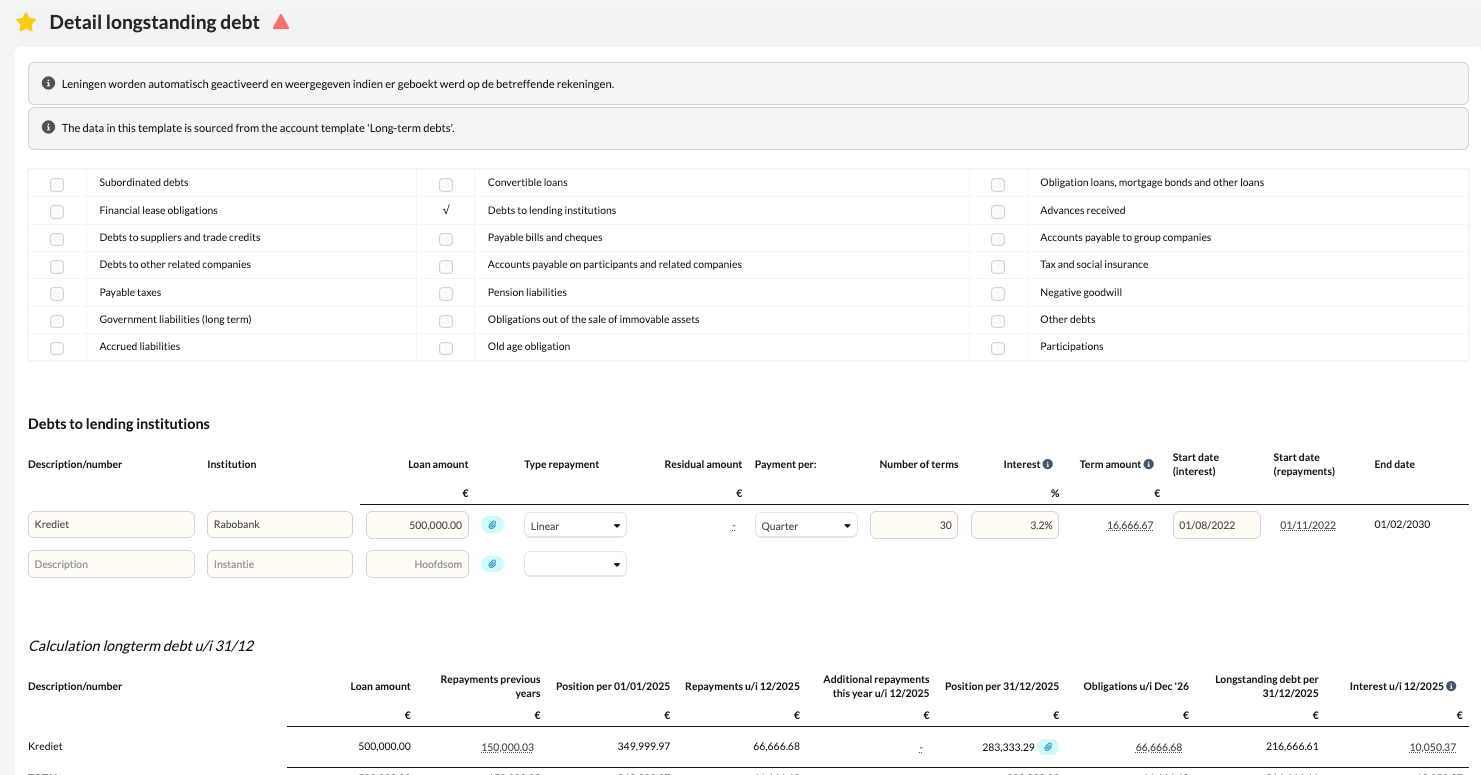
How to proceed
- Open the Detail longstanding debt template in the client file.
- Complete the relevant details per loan, such as principal amount, interest rate, and term.
- Check that the system calculates the correct balances and compare these with the posted amounts in the bookkeeping.
- If necessary, adjust the postings in the bookkeeping so that both balances match.