
| User Roles |  Admin |  Staff contributor |  External contributor | ✗ Pulse user |
This article explains how to use the 'Overview ageing balance creditors' template within the client file.
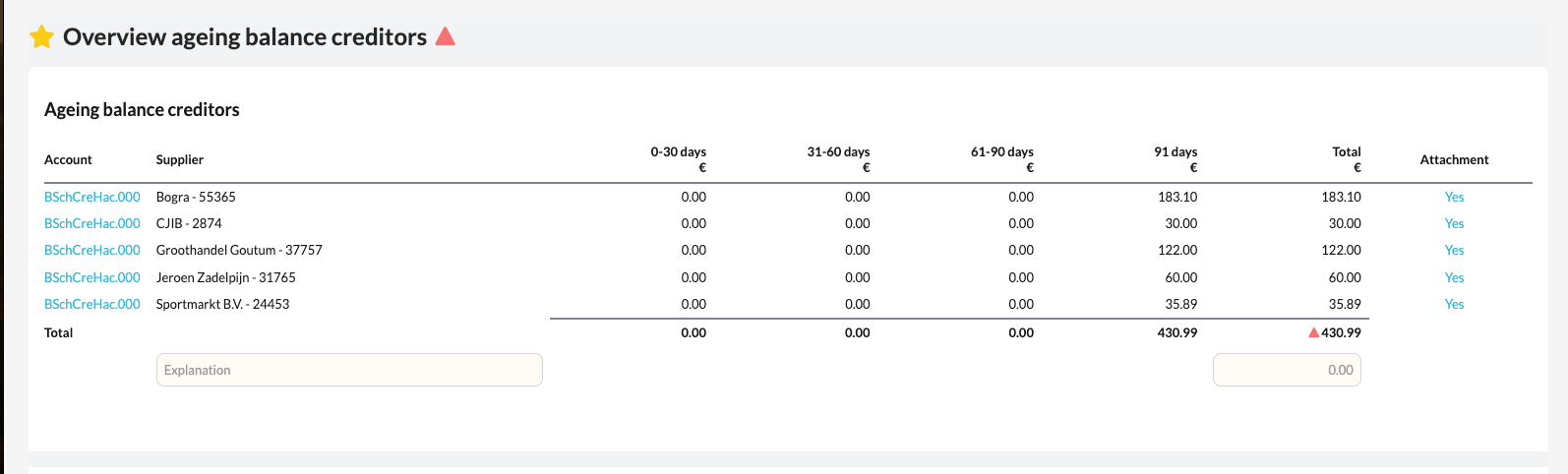
This template gives you insight into the outstanding items with creditors, sorted by age, so you can easily see which invoices still need to be paid.
Table of contents
What does the template do?
- The Overview ageing balance creditors template automatically collects all data from the 'Creditors' account template for the linked general ledger accounts.
- The result is a clear overview of all outstanding amounts owed to suppliers, divided into ageing categories (for example 0–30 days, 31–60 days, >90 days).
- In addition, the template reconciles the total creditors balance, which is particularly useful when multiple general ledger accounts or RGS groups are active.
How to proceed
- Open the Overview ageing balance creditors template in the client file.
- Check that all relevant creditor accounts are correctly linked to the Creditors account template.
- Review the ageing analysis to see which invoices are still outstanding and how long they have been unpaid.
- Check that the total balance matches the posted amounts in the bookkeeping.