
| User Roles |  Admin Admin |  Staff contributor Staff contributor | ✗External contributor | ✗Pulse user |
In this article, you will learn how the notes to the balance sheet are used within the financial statements workflow.
All notes for balance sheet items are structured in the same way, so this explanation applies to all sections within this category.
Table of contents
Notes to the balance sheet: general operation
Explanation
All notes for balance sheet items are structured in the same way within Silverfin.
This explanation therefore applies to all templates within the financial statements workflow.
At the top of each note, you will find a number of settings that allow you to determine which information is or is not included in the annual accounts.
Settings at the top of the template
Using the options at the top of the template, you can enable or disable sections:
- Table
- Movement schedule total all categories
- Show previous year
- Movement schedule […] (if available)
These options are explained in more detail below.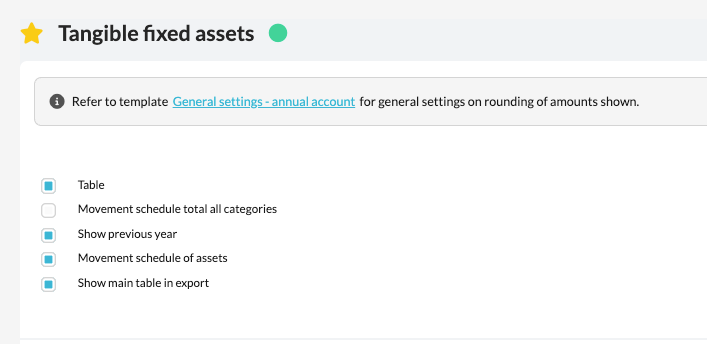
1. Table
This option determines whether an overview of all subtotals within the relevant RGS group is displayed.
Please note:
If you disable this option:
- no specifications at general ledger level will be shown;
- no movement schedules at sub-group level will be displayed.
2. Movement schedule total all categories
This option allows you to include a movement schedule based on the totals of the complete RGS group in the note.
It is also possible to generate a movement schedule at sub-group level from within the table, if required.
3. Show previous year
When a prior financial year is available in the file, this option becomes visible.
In situations where the first year was used solely for processing the opening balance, you can use this option to determine whether or not to show the prior year figures in the note.
4. Show movement schedule […]
Where available, a movement schedule from an underlying reconciliation template can be included in the note.
Examples of this include:
- Movement schedule – Fixed Assets (via the depreciation schedule)
- Movement schedule – Participations
- Movement schedule – Provisions
- Movement schedule – Equity
This option is only visible when an associated movement schedule is available in the file.