
| User Roles |  Admin Admin | ✗ Staff contributor | ✗ External Contributor | ✗ Pulse user |
This article explains how administrators can copy a standard report at firm level and adapt it to their firm’s needs.
- If a standard report does not fully meet your needs, the recommended approach is to create a copy of it.
- After copying the report, you can modify the copy to suit your firm’s preferences. For example, you can adjust the layout, wording, or structure while keeping the original standard report unchanged. This ensures that the standard template remains available while giving you the flexibility to tailor reports to your own requirements.
Note: Only users with administrator rights can copy reports at firm level.
How to copy a report on a firm level?
- Go to Templates at firm level.
- Select the Reports category.
- Find the report you want to copy.
- Create a copy in one of the following ways:
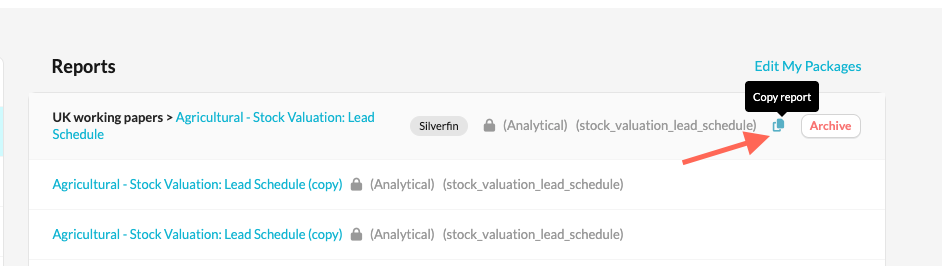
- Click Copy report directly from the list of reports.
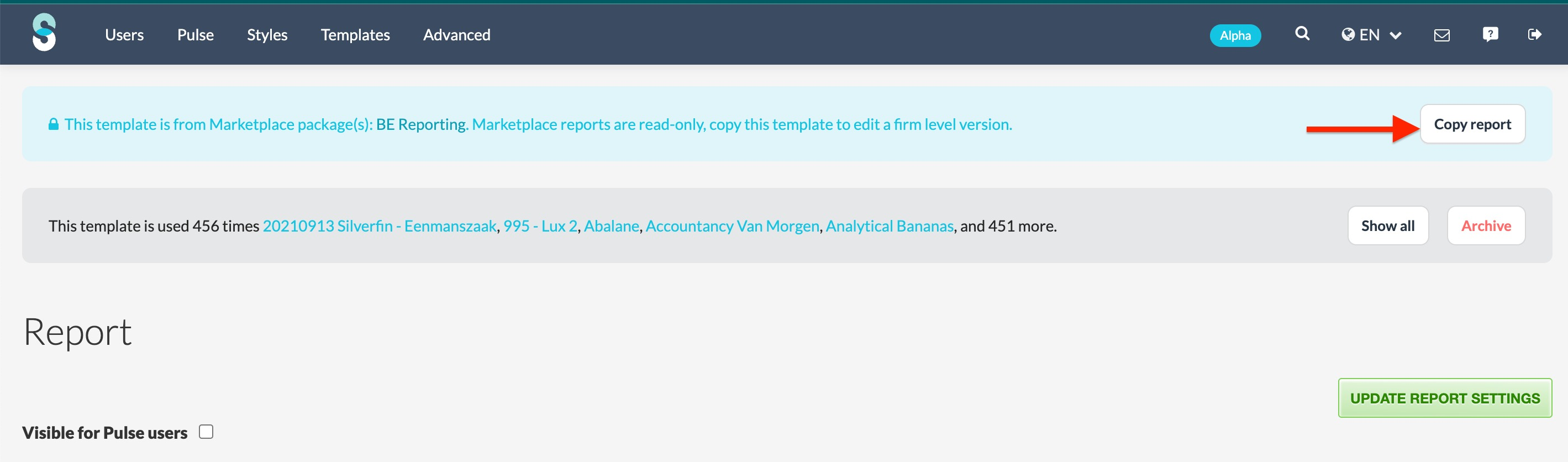
- Open the report first, then click Copy report.
- Click Copy report directly from the list of reports.
- Enter a name for the new report.
- Choose whether you want to keep it as a report or convert it into a workflow working screen.
- Save your copy.
- Once the report has been copied, you can edit it to match your firm’s internal preferences without affecting the original report.