
| User Roles | ✓ Admin | ✓ Staff contributor | ✗ External Contributor | ✗ Pulse user |
This article explains how Silverfin integrates with Companies House to display filing deadlines for annual accounts and confirmation statements. It is relevant for all users who work with UK entities in Silverfin and need to understand the status of their Companies House filings.
Table of contents
- Companies House Integration in Silverfin
- How Silverfin Displays Companies House Filing Deadlines
- Determining Overdue Status
- Resolving Companies House Status Discrepancies
Companies House Integration in Silverfin
Silverfin connects directly with Companies House to retrieve public company information. This integration ensures that the filing deadlines and company status displayed in Silverfin reflect the official records held by Companies House.
How Silverfin Displays Companies House Filing Deadlines
Silverfin retrieves the official filing deadlines directly from Companies House. It does not calculate these deadlines itself, ensuring that the dates displayed in Silverfin reflect the official Companies House records, including any extensions or special circumstances.
Annual Accounts Deadlines
For Annual Accounts, Silverfin displays the specific filing deadline as provided by Companies House. This is typically nine months after a company's accounting reference date (ARD), but can vary for first accounts or if extensions have been granted.
Confirmation Statement Deadlines
For the Confirmation Statement, Silverfin retrieves the precise filing deadline from Companies House. This is generally 14 days after the anniversary of the company's incorporation or the date of the last confirmation statement.
Determining Overdue Status
Silverfin marks a filing as "overdue" if the current date has passed the official filing deadline retrieved from Companies House. This status provides an immediate visual indicator of compliance within your Silverfin environment.
Resolving Companies House Status Discrepancies
If you believe a Companies House status in Silverfin is incorrect or shows as overdue prematurely, follow these steps:
- Check Companies House Directly: Always verify the official filing status and deadlines on the Companies House website. This is the definitive source of truth.
- Check Companies House connection: Sometimes outdated statuses remain due to the Companies House connection no longer being active. When you notice a discrepancy, it's important to first check if the client is still connected to the Companies House synchronisation.
You can check this at "Edit Client" - "Sync".
If a connection with Companies House exists, you can see it at "Client information data sync".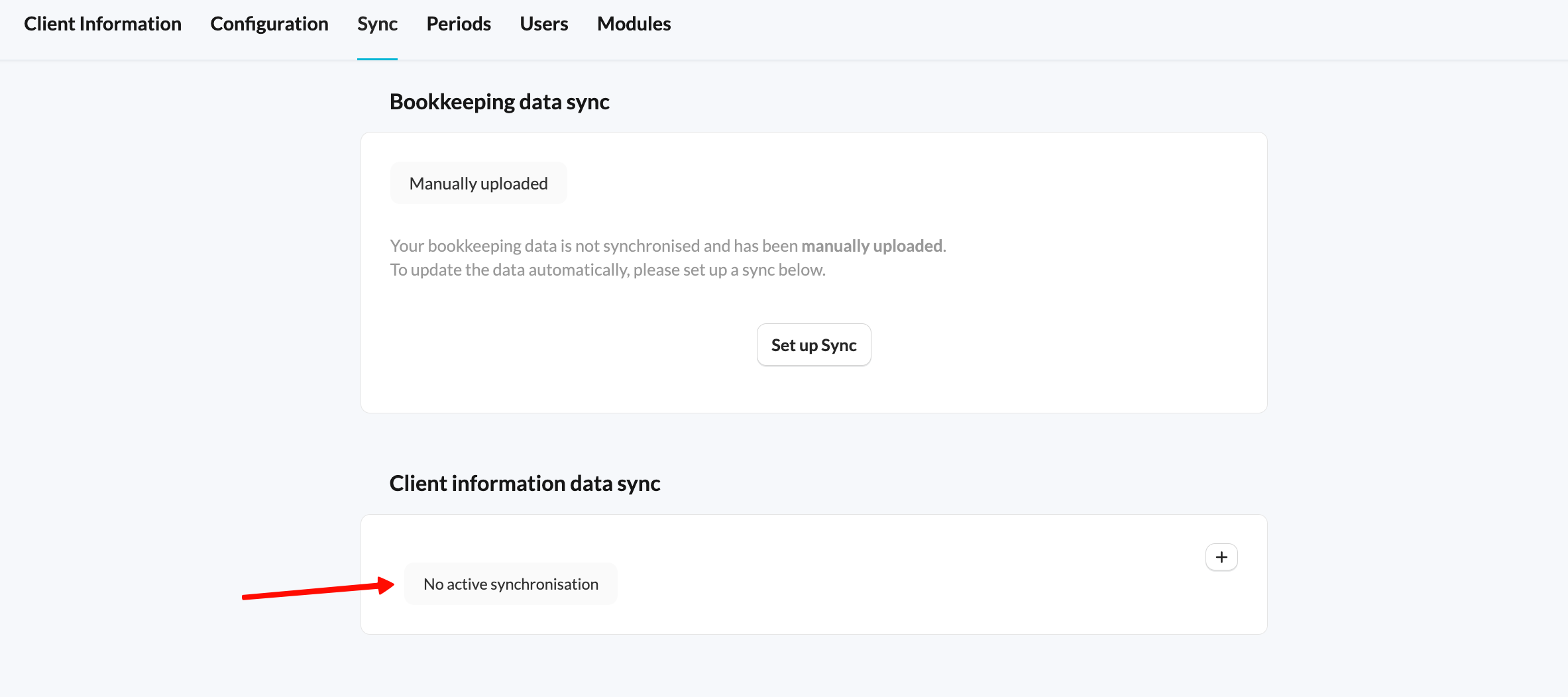
- Verify Data Sync: Silverfin regularly syncs data from Companies House. If there has been a recent change or extension registered with Companies House, it may take a short period for Silverfin to update.
- Contact Support: If the discrepancy persists after checking Companies House and allowing time for a sync, please contact Silverfin Support. Provide details of the company and the specific filing deadline that appears incorrect. This will help our team investigate potential integration issues or data synchronisation problems.
Always cross-reference deadlines with the official Companies House website. Silverfin reflects their data, so any discrepancies are usually due to recent changes not yet synced.