
| User Roles |  Admin Admin |  Staff contributor Staff contributor | ✗External contributor | ✗Pulse user |
Use the Property revaluations template when a company has investment property revaluations that create a deferred tax timing difference. The template helps you calculate the unrealised capital gain for each property, decide how much of the timing difference is recognised in the income statement or other comprehensive income, and flow the result into the UK Corporation Tax disclosure workflow.
The feature was released on 24 June 2026 for the UK market.
Table of contents
- When should I use this template?
- Before you start
- Step 1: Enable the new P&L/OCI tax treatments
- Step 2: Add and populate the Property revaluations template
- Step 3: Complete the Unrealised Capital Gains section
- Step 4: Complete the Revaluations timing differences table
- What flows through to the rest of Corporation Tax?
- What rolls forward next year?
- Frequently asked questions
When should I use this template?
Use this template where the client has investment properties and you need to analyse the unrealised gain for deferred tax purposes.
The template is designed for property revaluation timing differences. It is not a replacement for the chargeable gains calculation on an actual disposal, and it does not post journals to the accounts.
Before you start
Make sure the UK Corporation Tax workflow has been added to the file.
If you want Silverfin to pull property data automatically, add and complete the Investment property register before completing Property revaluations. The link uses property rows entered in the Investment property register.
If you want to enter the calculation manually, you do not need the Investment property register. You can add each property directly in the Property revaluations template.
Step 1: Enable the new P&L/OCI tax treatments
Open Profit and loss / Other comprehensive income in the Corporation Tax workflow.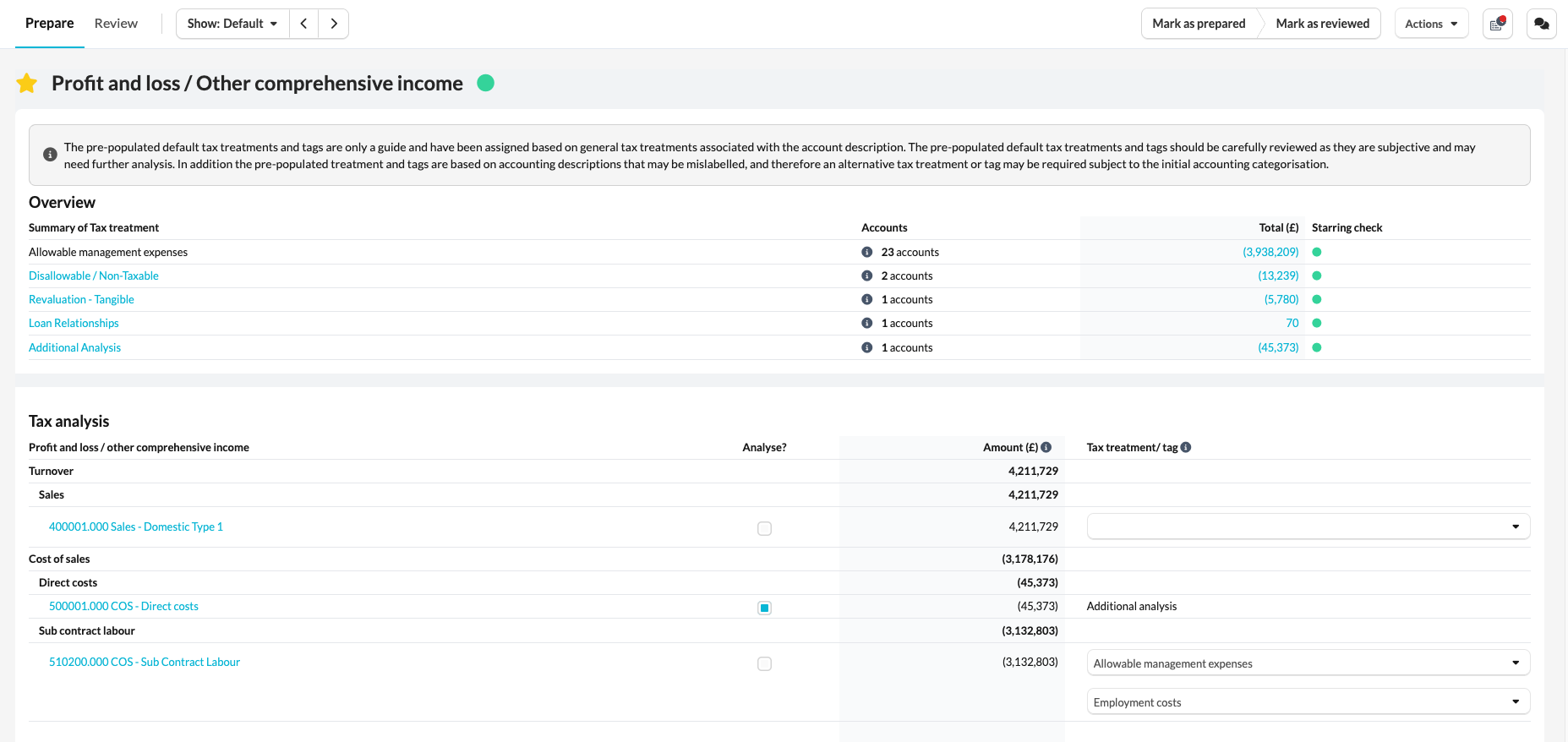
For accounting periods starting before 1 April 2025, use the Settings section and tick Enable individual Tax treatment options for depreciation, tangible impairment, and tangible revaluation. For accounting periods starting on or after 1 April 2025, these split tax treatments are enabled automatically.
This adds three separate tax treatments in P&L/OCI and Account - Tax analysis:
- Depreciation
- Impairment - Tangible
- Revaluation - Tangible
Use Revaluation - Tangible for accounts or analysis lines that relate to tangible property revaluation movements. Use Depreciation or Impairment - Tangible where those items need to be analysed separately.
If you use Additional analysis from P&L/OCI, the same split tax treatments are available in the Tax analysis section of the account template. Amounts entered there also feed the fixed asset and tax computation summaries.
Step 2: Add and populate the Property revaluations template
Add Property revaluations from the Tax disclosures section of the Corporation Tax workflow.
At the start of the Unrealised Capital Gains section, choose the Data entry method:
- Manual data entry
- Link to investment property register
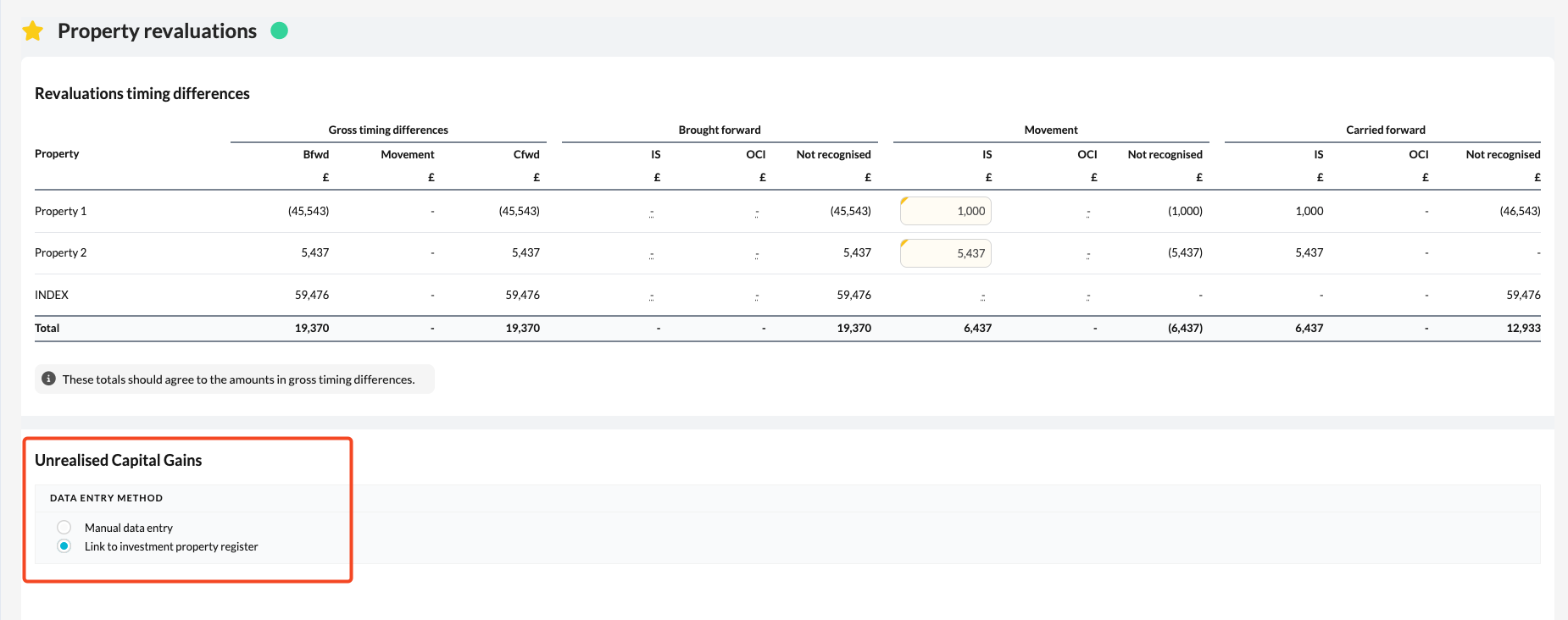
Use Manual data entry when the property details are not held in the Investment property register, or where you want to maintain the property revaluation calculation directly in this template.
Use Link to investment property register when the investment property data has already been entered in the Investment property register. The template will read the property name, acquisition cost, cost additions, revaluation movements, and disposal information from the register.
If you select Link to investment property register and the register has not been added to the workflow, Silverfin will show a warning asking you to add it. If the register exists but contains no property rows, Silverfin will tell you that no properties were found.
Step 3: Complete the Unrealised Capital Gains section
The Unrealised Capital Gains section calculates the potential capital gain or loss for each property.
For manual data entry, add a property and enter:
- Property name
- Opening proceeds, which should usually be the opening net book value
- Closing proceeds, which should usually be the closing net book value
- Allowable cost or addition rows, with the date, description, and amount
For linked data entry, the template calculates the same information from the Investment property register. Acquisition costs and cost additions are treated as allowable costs. Revaluation movements affect the property value used in the proceeds calculation, but not the allowable cost base. Disposal entries are reflected in the opening or closing position based on the disposal date.
For each property, Silverfin calculates:
- Proceeds
- Less allowable costs
- Unindexed gain or loss
- Less indexation allowance to December 2017
- Potential capital gain or loss
Where there is an unindexed gain, indexation allowance is capped so that it does not turn that gain into a loss.
Step 4: Complete the Revaluations timing differences table
The first table in Property revaluations is the Revaluations timing differences table.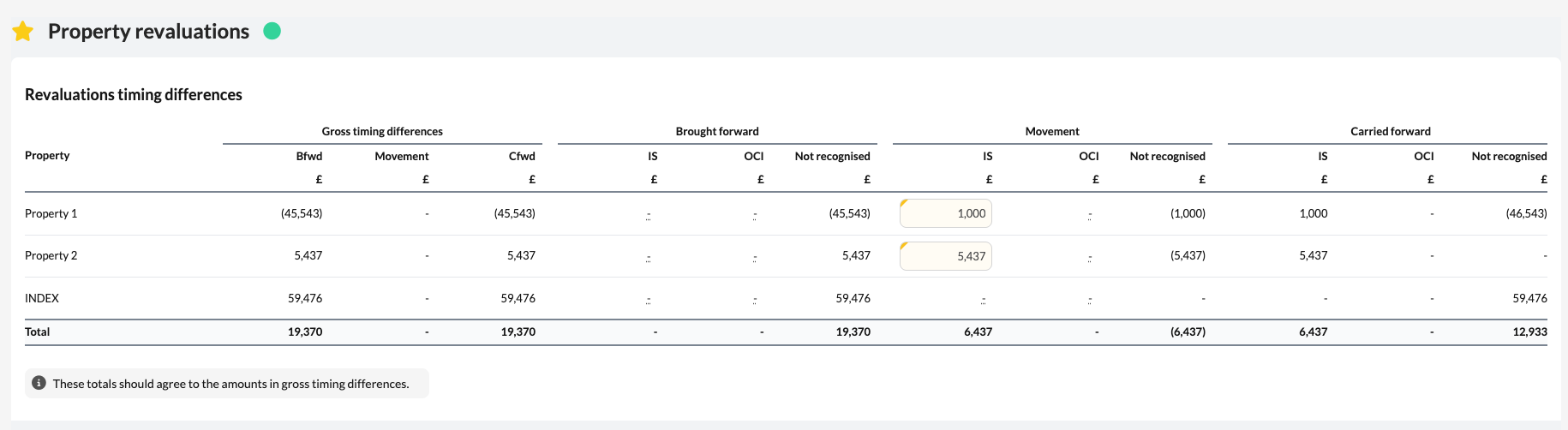
Silverfin calculates the gross timing difference for each property using the unrealised capital gains calculation. You then enter how much of that timing difference is recognised in:
- Income statement
- Other comprehensive income
You enter these amounts for the brought-forward position and for the current-year movement. Silverfin calculates the amounts not recognised and the carried-forward recognised balances.
The table is split into three sections:
- Gross timing differences: brought forward, movement, and carried forward
- Brought forward recognised: income statement, OCI, and not recognised
- Movement recognised: income statement, OCI, and not recognised
- Carried forward recognised: income statement, OCI, and not recognised
The totals should agree back to the gross timing differences calculated in the Unrealised Capital Gains section.
What flows through to the rest of Corporation Tax?
P&L/OCI and Account - Tax analysis
Once the split treatments are enabled, P&L/OCI and Account - Tax analysis show Depreciation, Impairment - Tangible, and Revaluation - Tangible separately instead of only using the combined Depreciation / impairment / revaluation treatment.
P&L/OCI still provides a combined depreciation, impairment, and revaluation total for templates that need the old total, so the wider workflow remains connected.
Tangible fixed asset summary
The Tangible fixed asset summary shows the split items as separate summary lines where relevant:
- Depreciation
- Impairment - Tangible
- Revaluation - Tangible
Amounts can come from the main P&L/OCI analysis or from Additional analysis completed in an account.
Tax computation and trading/property income
The Corporation Tax computation and the trading/property income calculations can show the split items separately. Revaluation - Tangible defaults to the Property revaluations timing difference category, while depreciation and tangible impairment continue to default to the net book value of qualifying assets category.
Deferred tax disclosures
A new Property revaluations timing difference category is available in the deferred tax disclosure categories. This lets the revaluation timing difference be analysed separately from other timing differences in the Tax disclosures workflow.
What rolls forward next year?
In manual mode, property cost rows roll forward. Closing proceeds become next year's opening proceeds, the closing gross timing difference becomes the new brought-forward gross timing difference, and brought-forward recognised income statement and OCI amounts roll forward from the prior year closing recognised balances. Current-year movement fields clear for the new year.
In linked mode, property values recalculate from the Investment property register each year. Recognised brought-forward income statement and OCI amounts roll forward from the prior year closing recognised balances, and current-year movement fields clear.
Frequently asked questions
Why can I not see Revaluation - Tangible in P&L/OCI?
For accounting periods starting before 1 April 2025, open the Settings section in Profit and loss / Other comprehensive income and tick Enable individual Tax treatment options for depreciation, tangible impairment, and tangible revaluation. For accounting periods starting on or after 1 April 2025, the split treatments are available automatically.
Do I need to use the Investment property register?
No. Use Manual data entry if you want to maintain the calculation directly in Property revaluations. Use Link to investment property register if the properties are already maintained in the register.
Why is my linked Property revaluations template empty?
Check that the Investment property register has been added to the workflow and that property rows have been added. The template only pulls linked data from those property rows.
Does the template calculate indexation allowance?
Yes. Silverfin calculates indexation allowance to December 2017 using the dates and amounts entered manually or pulled from the Investment property register.
Does the template post anything to the accounts?
No. The template supports the Corporation Tax analysis and disclosure workflow. Any accounting entries should be posted separately in the accounts where required.