
| User Roles |  Admin Admin | ✗Staff contributor | ✗External contributor | ✗Pulse user |
When your file is connected to Xero and uses the marketplace Aged Debtors & Creditors template, Silverfin pulls your outstanding invoices from Xero and proposes them for the aged analysis in your work paper. Instead of typing in each debtor or creditor manually, you review the proposal and accept it. This article explains what the feature does, when it applies, how it works, and what to check when the proposal does not appear as expected.
Table of contents
- What does this feature do?
- Which accounts and templates does it apply to?
- How far back does it work?
- How does it work?
- Why the amounts may look different from Xero's own aged report
- Frequently asked questions
What does this feature do?
Silverfin retrieves your open (outstanding) invoices from Xero and turns them into an aged breakdown per contact. It then shows a Silverfin Assistant proposal to add, update, or remove aged lines in your workpaper. When you accept, the aged analysis is filled in automatically.
This works for both:
- Aged receivables: money customers still owe you
- Aged payables: money you still owe suppliers
The goal is to save time, avoid manual retyping, and keep the aged analysis consistent with what is in Xero.
Which accounts and templates does it apply to?
The feature is tied to the Aged Debtors & Creditors template from the Silverfin marketplace. It works only on these four mapped accounts:
| Account | What it represents | Which invoices |
| 140000 | Trade debtors due within 1 year | Customer invoices due 1 year or less after period end |
| 150000 | Trade debtors due beyond 1 year | Customer invoices due more than 1 year after period end |
| 240000 | Trade creditors due within 1 year | Supplier invoices due 1 year or less after period end |
| 250000 | Trade creditors due beyond 1 year | Supplier invoices due more than 1 year after period end |
Silverfin routes each invoice to the right account based on its due date relative to the period end date. The split between the two accounts exists so short-term and long-term debtors and creditors are shown separately on the balance sheet.
A note on sync type: this feature works with the regular Xero sync. It does not work with the XeroTB sync, which only brings in trial balance totals rather than individual transactions.
How far back does it work?
Silverfin fills in aged data for the current period and the last 2 financial years. "Current period" depends on how your file is set up: the current month for monthly files, the current quarter for quarterly files, or the current year for yearly files. For periods further back than 2 financial years, the aged data is not filled in automatically.
How does it work?
1. Silverfin syncs with Xero
Silverfin takes your invoices from Xero and works out how much was still outstanding on the period end date. Because the balance is taken as at the period end, an invoice that has since been paid can still appear if it was still open on that date. A December 2025 workpaper therefore shows the balances as they stood on 31 December 2025, not today. The data refreshes after you run a sync manually, and again automatically overnight.
2. The Silverfin Assistant shows a proposal
When you open one of the four eligible accounts, the Silverfin Assistant compares the aged data in your workpaper with what it has from Xero. If there is a difference, it shows a proposal. If the data already matches, there is nothing to propose.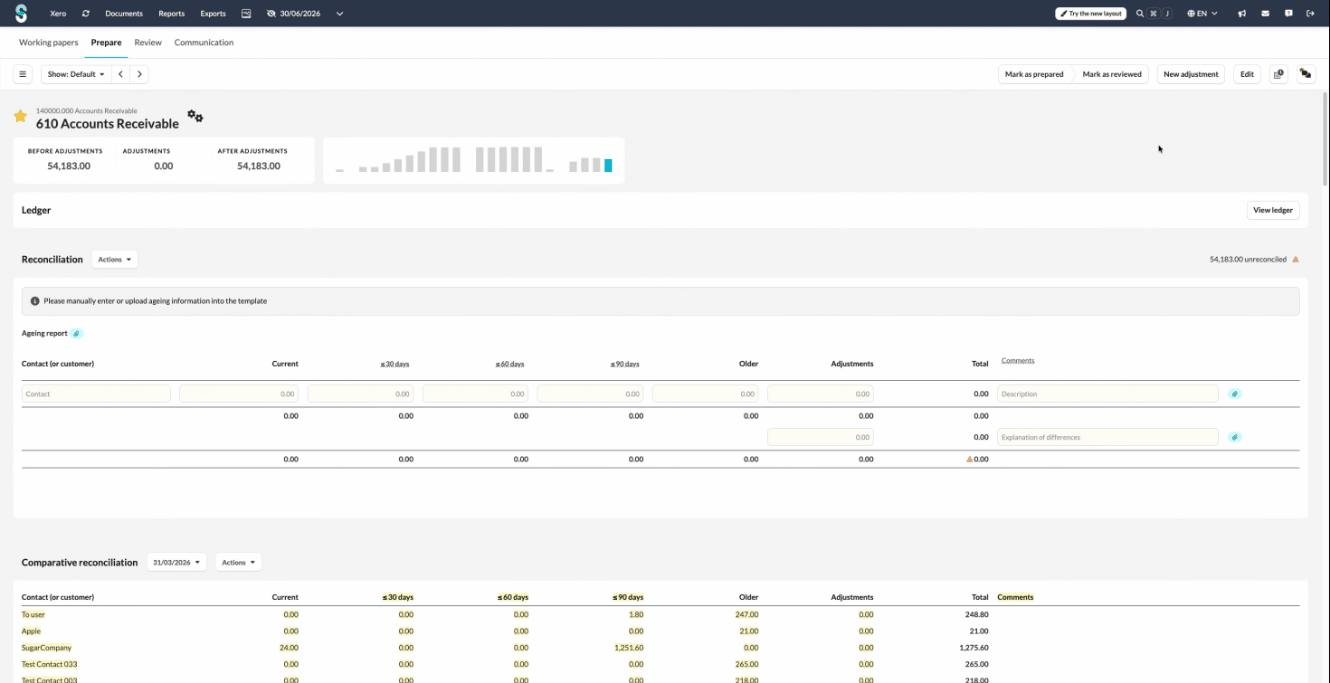
3. You review and accept the proposal
The proposal shows a preview with the changes highlighted. For each contact, the outstanding amount is split into ageing buckets:
| Bucket | Meaning |
| Current | Not yet overdue at period end |
| ≤ 30 days | 1 to 30 days overdue |
| ≤ 60 days | 31 to 60 days overdue |
| ≤ 90 days | 61 to 90 days overdue |
| Older | 91 days or more overdue |
New contacts appear as additions, changed amounts as modifications, and contacts whose invoices are now fully paid as deletions (removing the line that is no longer needed). Click Accept to apply, or Reject to leave the workpaper unchanged.
4. The workpaper is updated
After you accept, the aged analysis section is filled in. Any manual adjustments and comments you entered before are preserved: only the figures sourced from Xero are updated.
Why the amounts may look different from Xero's own aged report
Silverfin ages invoices by the exact number of days overdue relative to the period end date (less than or equal to 30 days, less than or equal to 60, less than or equal to 90, and so on). Xero's own aged report groups by calendar months. Because of this, the same invoice can appear under a different bucket header when you compare the two reports side by side, even when the totals match.
Silverfin calculates the outstanding amount as the invoice total minus any payments received on or before the period end date. If Xero's report uses a different method or reference date, small differences may appear.
Frequently asked questions
The Silverfin Assistant proposal is not showing up
The most common reasons are:
- The account does not use the Aged Debtors & Creditors marketplace template
- The account number is not one of 140000, 150000, 240000, or 250000
- The file is connected through XeroTB sync instead of the regular Xero sync
- The only invoices in Xero are draft: only authorised and paid invoices are imported
- A sync has not completed since the invoices were created or changed in Xero. Run a manual sync and check again
- The aged data in the workpaper already matches Xero, so no proposal is needed
- The period is older than 2 financial years
An invoice is in Xero but does not appear in the proposal
Check the following:
- Is the invoice authorised or paid? Draft, voided, and deleted invoices are not imported
- Does the invoice still have an outstanding balance in that period? Fully paid invoices are not shown
- Was the invoice dated on or before the period end date? For a December 2025 period, only invoices dated on or before 31 December 2025 are included
- Has a sync run since the invoice was created or updated in Xero?
An invoice appears under the wrong account (for example 140000 instead of 150000)
The routing is based on the invoice due date compared to the period end date. A due date of 1 year or less after period end goes to 140000 or 240000; a due date of more than 1 year goes to 150000 or 250000. If an invoice is in the wrong account, check its due date in Xero.
The proposal does not appear even though everything looks eligible
The proposal only appears when Silverfin can reconcile the figures from Xero to your workpaper. In the rare case where it cannot, no proposal is shown for that account. This happens only occasionally, so if the proposal is missing, first check the points above.
If your question is not covered here, or the figures still look wrong after checking the points above, please contact Silverfin Support.