
| User Roles |  Admin Admin |  Staff contributor Staff contributor | ✗External contributor | ✗Pulse user |
The Holiday accrual reconciliation builds a per-employee working paper for the cost of holiday pay accrued but not taken at the period end (plus the associated employer National Insurance), and reconciles it against the account(s) you select from the chart of accounts. This article explains when to use it, how the Simple and Complex modes differ, and how the reconciliation resolves. It is relevant for UK teams preparing holiday pay accruals in the Working Papers workflow.
Table of contents
- When should I use this template?
- What do I need before I start?
- What does this template calculate?
- How do I choose between Simple and Complex?
- How do I complete the Simple employee schedule?
- How do I set the statutory leave year, working days and accounts (Complex)?
- How do I complete the Complex employee schedule?
- How do I reconcile and explain differences (Complex)?
- What flows through to the rest of the accounts?
- What rolls forward next year?
- Where does the data come from?
- Frequently asked questions
When should I use this template?
- This is one of two Silverfin UK templates called Holiday accrual. This one is a standalone reconciliation text, added to the Working Papers workflow and pointed at the relevant account(s) via its own account picker. The other is the Holiday accrual account template, which does the same calculation but is attached directly to one specific liability account instead. Both use the same Simple/Complex calculation logic.
- Use this reconciliation where the firm adds a fixed set of reconciliations to the Working Papers workflow rather than attaching templates directly to individual accounts, or where the accrual is spread across more than one nominal code (the account picker lets you select several accounts at once). If the firm instead attaches templates directly onto accounts in the chart of accounts, use the Holiday accrual account template instead.
Don't run both templates for the same balance — pick whichever matches how the firm's workflow is built.
What do I need before I start?
- Know which account(s) hold the closing accrued holiday pay balance — the default account range offered is 240400, 24041, 240505, 250400 and 25041, but any account(s) can be selected.
- Decide Simple or Complex before entering data — the two options use separate tables, and switching later starts a fresh schedule.
- Gather employee salary and leave records: annual salary, annual holiday entitlement, start dates, holidays taken, and any brought-forward balance.
What does this template calculate?
Holiday pay accrued but not yet taken at the period end is a short-term employee cost, so the template calculates it on an undiscounted basis and combines it with the associated employer National Insurance (currently hard-coded at 13.8%, marked in the code for review as the rate changes) to arrive at the Total Accrual — the figure this working paper reconciles (in Complex mode) to the selected account(s).
How do I choose between Simple and Complex?
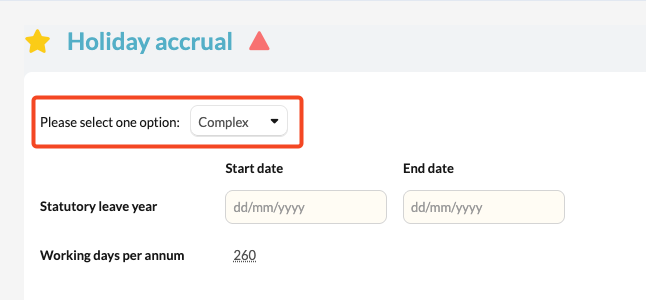
A dropdown ("Please select one option") lets you pick Simple or Complex (defaults to Complex).
- Simple — a quick one-row-per-employee schedule based on annual salary and the number of accrual days outstanding at the period end.
- Complex — a full statutory-leave-year schedule that tracks entitlement, days taken, and brought-forward/carried-forward balances, and includes the account picker used to reconcile the schedule.
The standard rollforward infotext ("Did you Copy Data from a previous period?") appears automatically where relevant — it is informational rather than something you fill in.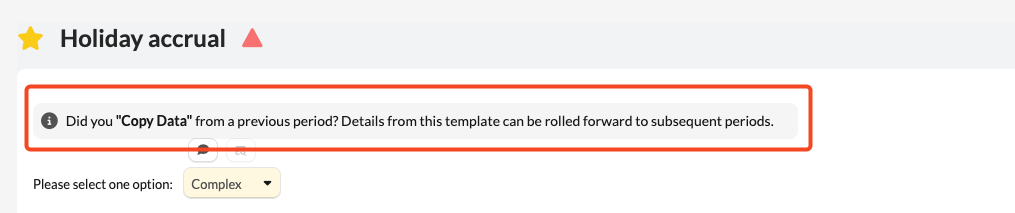
How do I complete the Simple employee schedule?
Next to the Name column header is a file-attachment control, so supporting evidence (e.g. a payroll leave report) can be attached to the schedule. For each employee enter Name, Yearly salary and Accrual (days). The template calculates Daily rate (salary ÷ 260), Holiday accrual (daily rate × accrual days), Employer NI (13.8% of the holiday accrual), and Total Accrual.
The Simple option does not compare its total to any account balance — there is no reconciliation check in this mode, only totals.
How do I set the statutory leave year, working days and accounts (Complex)?
Enter the Statutory leave year start and end dates and the Working days per annum (defaults to 260).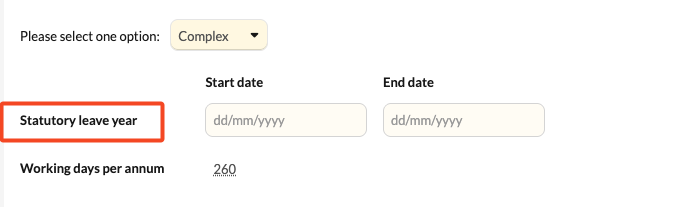 Then use the account-range picker to select the account(s) to be reconciled — it defaults to a preset range of accrual-related nominal codes (240400, 24041, 240505, 250400, 25041), but any account(s) within the firm's chart can be chosen. The combined value of the selected accounts becomes the balance the schedule is reconciled against.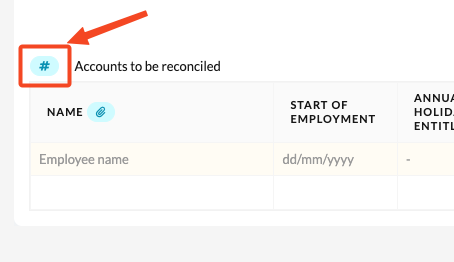
How do I complete the Complex employee schedule?
A file-attachment control again sits next to the Name column. For each employee enter Name, Start of Employment, Annual holiday entitlement, B/F (balance brought forward), Holidays taken, and Annual Salary. The template calculates Months entitled (an approximate month count from start of employment, or the statutory year start if later, to the period end), Leave accrued (entitlement ÷ 12 × months entitled), Holiday accrual (leave accrued + B/F − holidays taken), PTO Accrual, Employer NI, and Total Accrual.
This proration is month-based, whereas the equivalent Holiday accrual account template prorates by calendar days — the two will not produce identical figures for a part-year employee. Pick one template and stay with it for a given employee/account rather than switching between them.
How do I reconcile and explain differences (Complex)?
- If the Total Accrual doesn't match the selected accounts' combined balance, an Explanation of differences section appears — add a description and amount per item — and a Total after explanation line is shown.
- An unreconciled indicator (with the trial balance value, total explained, template value and remaining difference) only appears if a difference still remains; if the figures tie out exactly, no separate "reconciled" tick is displayed.
- Unlike the account template, there is no adjustment button here to post a journal for any remaining difference — any correcting entry needs to be posted separately.
What flows through to the rest of the accounts?
The Total Accrual supports the accrued holiday pay (and employer NI) included within accruals/other creditors on the balance sheet for whichever account(s) were selected, feeding the accruals/creditors figure and the staff costs note in the accounts.
What rolls forward next year?
In Complex mode, each employee's closing Holiday accrual becomes next period's brought-forward (B/F) figure automatically once the statutory year has passed its end date; the employee list, salary, dates and the selected account(s) roll forward via the normal Copy Data process. The statutory leave year dates and working days per annum also roll forward but should be reviewed each year the leave year changes.
Simple mode has no brought-forward field — each period's accrual is calculated fresh from the days outstanding entered at that date, and is never reconciled to an account balance.
Where does the data come from?
Employee names, salaries, leave entitlement and days taken are entered manually (or copied forward) inside the template. The reconciliation figure (Complex mode only) is the combined balance of whichever account(s) are selected via the account-range picker (defaulting to 240400, 24041, 240505, 250400, 25041). The employer NI rate (13.8%) is hard-coded in the template and needs a template update if the statutory rate changes.
Frequently asked questions
Why doesn't my Simple schedule show a reconciled/unreconciled indicator?
The Simple option in this template never compares its total to an account balance — only Complex mode reconciles. Switch to Complex, or use the Holiday accrual account template (which does reconcile in Simple mode for periods ending after 30 June 2023), if a tie-out is needed.
Which accounts should I select?
Whichever nominal code(s) carry the closing accrued holiday pay (and employer NI, if combined) balance. The default range (240400, 24041, 240505, 250400, 25041) is a starting point, not a restriction.
What's the difference between this and the Holiday accrual account template?
This reconciliation is a standalone workflow item with its own account picker and file-attachment control, and can reconcile against more than one account at once. The Holiday accrual account template is attached to a single specific account instead and includes a "post adjustment" button this reconciliation doesn't have. The Complex mode calculations also pro-rate entitlement differently (months here vs days in the account template).
Can I switch between Simple and Complex mid-year?
Data isn't shared between the two tables, so switching starts a fresh schedule — decide which to use before entering figures.