
| User Roles |  Admin Admin |  Staff contributor Staff contributor | ✗External contributor | ✗Pulse user |
The Return disclosure template captures the additional disclosures a company may need to make in its corporation tax return — the items that populate the CT600 supplementary pages. Complete only the sections that apply to the company; if none applies, the template does not need to be included in the return (the Overview checks this automatically).
Table of contents
- When should I use this template?
- How do I complete the sections?
- What flows through to the rest of Corporation Tax?
- Where does the data come from?
- Frequently asked questions
When should I use this template?
Use it where any of the disclosure items apply — for example controlled foreign companies, foreign permanent establishment exemptions, hybrid mismatches, cross-border royalties, tax avoidance schemes or exporter information.
How do I complete the sections?
The template is organised to mirror the CT600 supplementary pages (for example the section headed "B. Controlled foreign companies and foreign permanent establishment exemptions, hybrid and other mismatches"). The main sections are:
- Controlled foreign companies (CFC) — add a row per CFC. Enter the Name of CFC, select the Territory of residence and the Type of exemption due (if any) from the dropdowns, and complete the figures: percentage of apportionable profits and creditable tax, chargeable profits, tax on chargeable profits, creditable tax, reliefs in terms of tax, ACT as restricted, and the resulting CFC charge due. All CFCs entered here appear on the CT600B. A CFC that satisfies the Tax Exemption, the Excluded Territories Exemption or the Low Profit Margin Exemption does not need to be included on the CT600B, so you may choose not to enter it (this is explained in the on-screen note on the exemption column).
- Foreign permanent establishment exemption — tick the box to indicate the first period in which an election for foreign PE exemption applies, and complete the related figures.
- Hybrid and other mismatches — select the mismatch types that apply (for example an excessive PE deduction) and enter the amounts.
- Cross-border royalties — disclose cross-border royalty payments where relevant.
- Disclosure of tax avoidance schemes (DOTAS) — enter scheme reference details where the company has to disclose an avoidance scheme.
- Exporter information — complete where the exporter disclosure applies.
- Other return items — for example amounts to be surrendered, joint notices, and requests relating to repayments.
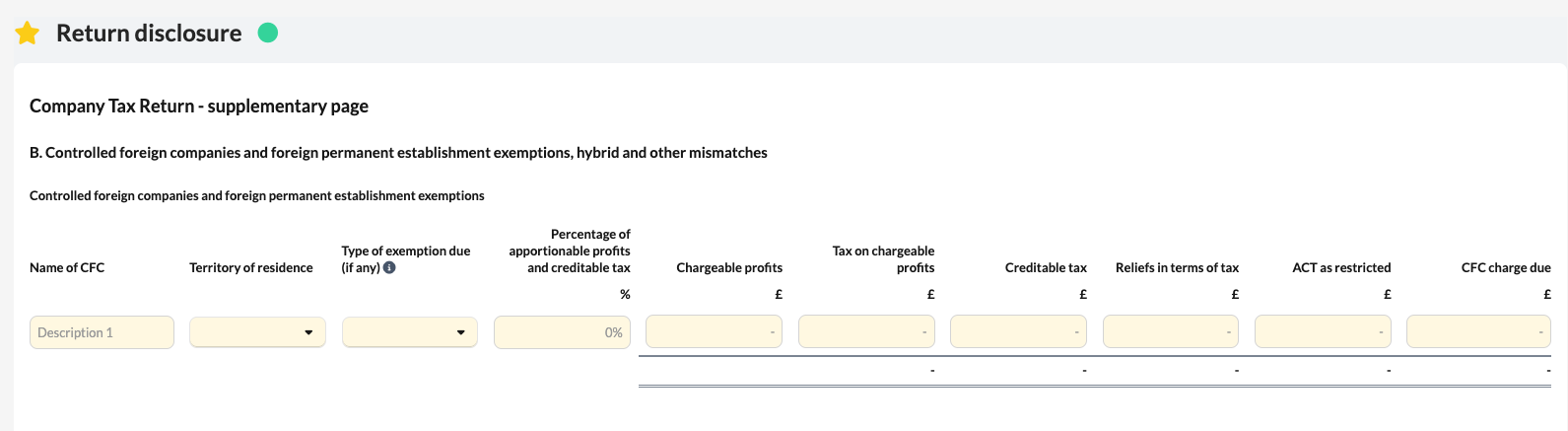
Each section is only relevant if it applies to the company — leave the others blank.
What flows through to the rest of Corporation Tax?
The disclosures populate the corresponding entries and iXBRL tags in the CT600 supplementary pages (for example the CT600B for controlled foreign companies). The Overview checks whether any disclosure item has been entered and, if so, includes the Return disclosure template in the return; if none has, it is not required.
Where does the data come from?
- The disclosure figures (CFCs, hybrid mismatches, cross-border royalties, tax avoidance schemes, exporter and foreign PE information) are entered here.
- The allowances and charges disclosure draws the capital allowances claimed from the capital allowance schedules (SBA, super-deduction, 100%/50% FYA, short-life assets and the tangible fixed asset summary); loss figures come from the Losses memorandum and tax figures from the Tax calculation.
- The Overview checks whether anything has been entered here to decide whether the template is included in the return.
Frequently asked questions
Do I always need to complete this template?
No. Complete only the sections that apply. If none applies, the Overview will not require it in the return.
Which CFCs do I need to include?
All CFCs you enter appear on the CT600B. A CFC that meets the Tax Exemption, Excluded Territories Exemption or Low Profit Margin Exemption need not be included on the CT600B.
How do I claim the foreign permanent establishment exemption?
Tick the box indicating the first period the election applies and complete the related figures.