
| User Roles |  Admin Admin |  Staff contributor Staff contributor | ✗External contributor | ✗Pulse user |
The Return information template is where you set up the key facts about the company and the return. It is the first template to complete in the UK Corporation Tax workflow, because the choices made here — in particular the business type — drive how every other template behaves.
Table of contents
- When should I use the Return information template?
- What do I complete in the Return information template?
- Why does the business type matter?
- What flows through to the rest of Corporation Tax?
- Frequently asked questions
When should I use the Return information template?
Complete Return information at the start of every corporation tax file, and revisit it whenever the company's circumstances change (a new business type, a change of signatory, or a change in the number of associated companies).
What do I complete in the Return information template?
Company information — Company name and Company registration number (pulled from the client record), Tax District Number, Unique Taxpayer Reference, and a Company type dropdown (defaults to "None of the above").
Period information — the period of account and accounting period(s), with the day count. Where the period of account is longer than 12 months, a second accounting period is shown so the return can be split (a long period of account). An "Is there an event in the period, for example commencement or cessation?" dropdown lets you flag a commencement or cessation of trade.
Business/es — first answer "Do you have more than one business?", then select the business type(s): UK trade, UK property business and UK investment business. This is the single most important setting: selecting more than one puts the workflow into hybrid mode, where income, adjustments and allowances are analysed separately per business type. A link to the published article How do I choose the correct business type for UK Corporation Tax? is provided here.
Return information — the return details, including: "What type of return are you submitting?" (e.g. New / Amended); whether you are making more than one return at the same time; whether estimated figures have been used; whether the company is a bank, building society, insurance company or other financial concern without a recognised turnover figure; which period you are attaching accounts for; a reason if you are not attaching accounts or computations; whether the company qualifies for the transfer pricing SME exemption; and whether it is a participating company in a Group Payments Arrangement.
R&D — flags for an R&D claim made by a large company, and for no R&D claim this period but a historical R&D claim to address.
Groups — group questions: whether the company is a member of a group or consortium for group relief purposes, a member of a group that is not small, and part of a group for the deductions allowance and loss carry-back extension cap.
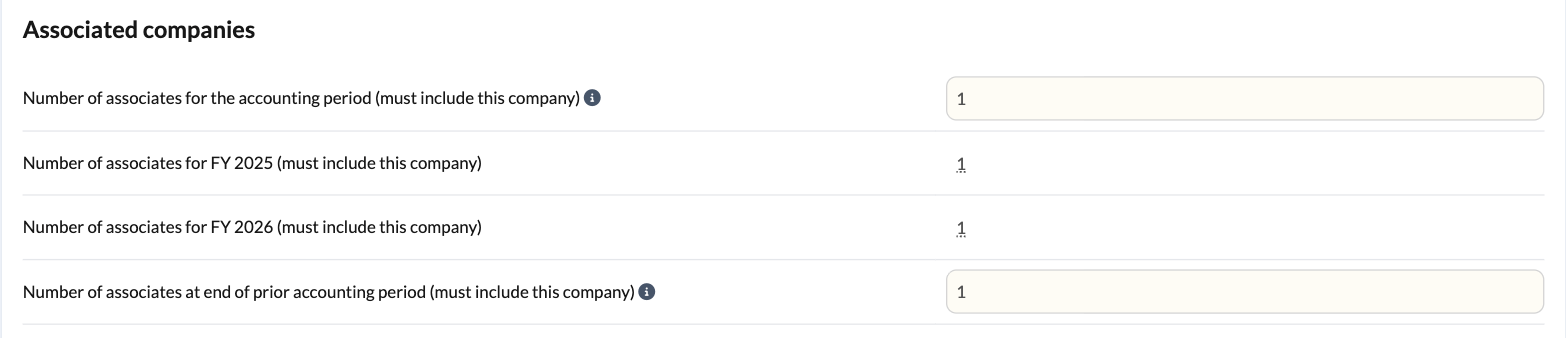
Associated companies — the number of associated companies for each accounting period, and for each financial year it covers. These drive the marginal relief thresholds. The names are then listed in the Associated Companies template, which must agree with this number.
An input, "Number of associates at end of prior accounting period", is used to scale the QIPs thresholds and must include this company. It defaults to last year's count, so most files will not need it changing.
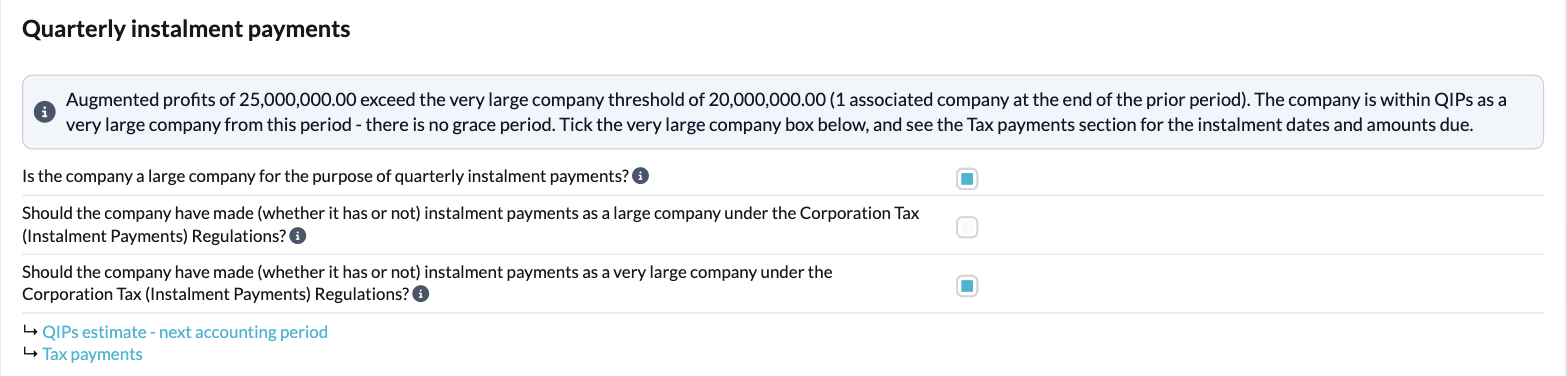
Quarterly instalment payments — this section tells you whether the company is within QIPs. A colour-coded message at the top shows whether the company is within QIPs, in its year of grace, or not within QIPs, and why. Augmented profits are compared with the £1.5m (large) and £20m (very large) thresholds, scaled for the length of the period and the number of associates at the end of the prior accounting period. The year of grace looks back at last year's return and applies the £10m ceiling.
Three questions follow: "Is the company a large company for the purpose of quarterly instalment payments?" (which makes CT600 box 326 use the number of associates at the end of the prior accounting period), and whether the company should have made instalment payments as a large company (CT600 box 630) or a very large company (CT600 box 631). Silverfin does not tick these for you, but where the company is within QIPs the box that applies becomes compulsory, and an amber caution appears if a box is ticked but profits are below the threshold. Links take you to the QIPs estimate and Tax payments templates.
Repayments — tick whether a repayment is due for the period, and whether there is an R&D payable credit meeting the HMRC CT600 Guide conditions; optionally decline small repayments below a stated amount; enter the bank / building society details; and, under Alternative details of repayment, indicate if the repayment should go to a person other than the company.
Declaration — the Status, Name and Date of the person making the declaration.
Why does the business type matter?
Most templates check that a business type has been selected. If none is selected, they show a warning and cannot calculate, with a link back to the Business/es section here. Selecting more than one puts the workflow into hybrid mode (for example a separate trading table and property table).
What flows through to the rest of Corporation Tax?
- The business type(s) determine which income, adjustment and capital allowance tables appear, and whether they are shown per business type.
- The accounting period(s) set whether a long period of account applies and how figures are apportioned; the event flag links to commencement/cessation treatment.
- The number of associated companies feeds the marginal relief calculation; the names go in the Associated Companies template.
- The Quarterly instalment payments answers populate CT600 boxes 630 and 631 and switch on the instalment schedule and interest workings in Tax payments. Where the company is large, the associated companies box uses the number at the end of the prior accounting period.
- The return details, R&D, group, repayment and declaration entries populate the corresponding boxes of the CT600.
Frequently asked questions
Which template should I complete first?
Return information — the business type and period settings here control the rest of the workflow.
Why is another template telling me no business type is selected?
Because the Business/es section here has not been completed. Answer "Do you have more than one business?" and select at least one business type.
How do I record associated companies?
Enter the number here; then list the names in the Associated Companies template. The two must agree.
How do I deal with a period longer than 12 months?
Enter the period of account here; Silverfin identifies the long period of account and shows the two accounting periods so a return can be prepared for each.
How do I mark an amended return or a repayment claim?
Set the return type in the Return information section, and use the Repayments section to indicate a repayment is due and enter the bank details.
How do I know if the company has to pay by quarterly instalments?
Check the message at the top of the Quarterly instalment payments section. It tells you whether the company is within QIPs, in its year of grace, or not within QIPs. If it is within QIPs, tick the large or very large company box. See How do I work with Quarterly Instalment Payments (QIPs) in Silverfin? (UK market) for more.