
| User Roles |  Admin Admin |  Staff contributor Staff contributor | ✗External contributor | ✗Pulse user |
The Balance Sheet analytical review template builds a period-on-period (or quarter/month-on-quarter/month) breakdown of the balance sheet, with automatic variance £ and % columns and a comment box against every line, so that the person preparing or reviewing the accounts can explain movements in assets, liabilities and equity before the accounts are finalised. It is a review/working-paper tool rather than a note or disclosure — its output is not carried into the primary statements or the notes. It supports the analytical review procedures that auditors and accountants are expected to perform as part of understanding the entity and assessing the risk of material misstatement (see Background, below), and it pairs with the P&L analytical review template, which does the equivalent job for the profit and loss account.
Table of contents
- When should I use this template?
- Before you start
- Background: why this working paper exists
- Step 1: Choose the comparison basis
- Step 2: Set the rounding
- Step 3: Review the table structure
- What flows through to the rest of the accounts/workflow?
- What rolls forward next year?
- Where the data comes from
- Frequently asked questions
When should I use this template?
Use it on any UK engagement where you want a structured, evidenced review of balance sheet movements year-on-year (or period-on-period) rather than a one-off eyeballing of the trial balance — for example checking that a debtors or creditors balance has moved in line with expectation, or that a fixed asset addition or new loan is understood and explained. Where the client is on a monthly or quarterly trial balance, it can also be used as a rolling management-accounts review during the year.
Before you start
- The relevant UK Working Papers workflow must be added to the company.
- The template reads directly from the trial balance using standard UK nominal-code mapping ranges (the same account-mapping convention used across Silverfin's UK templates), so it needs the trial balance/nominal ledger to already be mapped — there's nothing to configure in this template itself for that.
- Decide up front whether you want a yearly, quarterly or monthly comparison (Step 1) — this depends on how often the client's trial balance is produced.
- It's usually most useful to complete alongside, or shortly after, the P&L analytical review template so the two working papers are reviewed together.
Background: why this working paper exists
This template doesn't produce a note or a disclosure — nothing it calculates is picked up elsewhere in the accounts. It exists to give preparers and reviewers a structured place to compare current-period balances to a prior period, investigate any significant movements, and record an explanation for each one — for example, a fall in cash or a rise in creditors that isn't otherwise explained. That's a routine part of understanding the business and catching misstatements or going-concern indicators before the accounts are finalised — the template is evidence that review took place, not a source of figures for the accounts themselves.
Step 1: Choose the comparison basis
At the top of the template:
Comparison (custom.comparison.freq) — a dropdown whose options depend on how often the company's trial balance is produced (company.periods_per_year):
- Trial balance produced monthly (12 periods/year): Yearly, Quarterly or Monthly
- Trial balance produced quarterly (4 periods/year): Yearly or Quarterly
- Trial balance produced annually (1 period/year): Yearly only
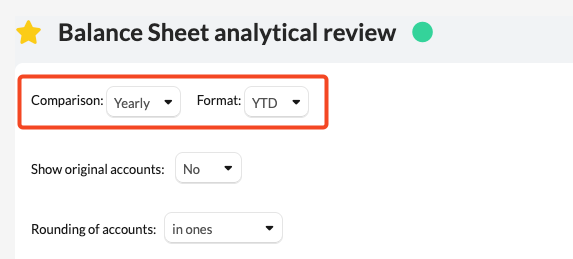
Default is Yearly.
- If you choose Monthly, a second field appears — Months to compare (custom.number.months), a dropdown from 1 to 11 (default 1) — controlling how many preceding months are shown alongside the current month.
- If you choose Yearly, a second field appears — Format (custom.data.format), a dropdown of YTD or PTD (default YTD). For a balance sheet, both give the same closing balance at the period end in most cases; the distinction matters more where the underlying trial balance resets or restates within the year — YTD always takes the closing balance as reported, while PTD nets off the previous period's closing balance to isolate the latest period's movement.
If you choose Quarterly, the template works out which quarter you're in from the trial balance dates and shows each quarter-end balance and its movement rather than requiring you to pick a quarter.
Underneath, Show original accounts (custom.show.original_accounts) is a Yes/No dropdown (default No). Leave it at No to see Silverfin's standardised, mapped account descriptions in the account-level breakdown; switch it to Yes to instead see the client's original trial-balance account numbers and names.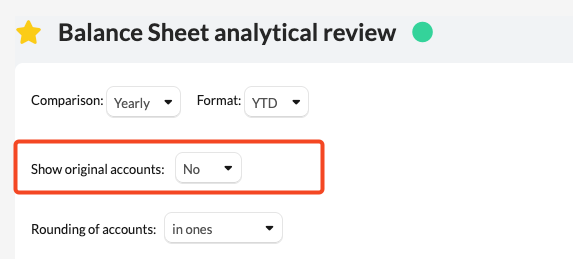
Step 2: Set the rounding
Rounding of accounts (custom.rounding.ofAcc) is a dropdown — "in ones", "in thousands" or "in millions" (default "in ones"). This scales every figure in the table and updates the currency heading shown under each column (£, £'000 or £'m) accordingly.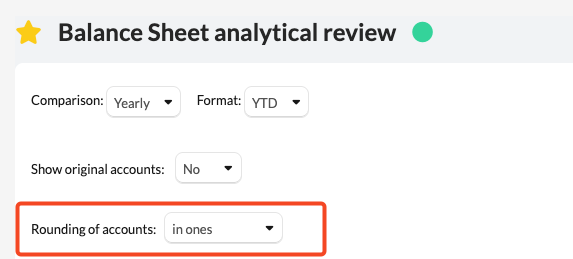
Step 3: Review the table structure
Unlike the P&L analytical review, the balance sheet is organised in up to four tiers, each with its own show/hide control:
- Top level — ASSETS, LIABILITIES, EQUITY — each with a boolean tick-box. Ticking it reveals the sections underneath.
- Section level (e.g. under ASSETS: Intangible assets, Tangible assets, Investments, Stock, Debtors, Cash and Cash Equivalents, Prepayments and accrued income; under LIABILITIES: Creditors: Amounts Falling Due in One Year, Creditors: Amounts Falling Due After One Year, Accruals and deferred income; under EQUITY: Capital, Reserves, Other reserves) — each has its own boolean tick-box and its own text field so you can overtype the standard description if needed.
- Sub-section level, used only under Investments (split into Non-current and Current) and Debtors (split into Current Debtors and Non-current Debtors) — each again with its own tick-box and overtypeable title.
- Category rows underneath any ticked section or sub-section (e.g. under Tangible assets: Land and Buildings – Freehold, Plant and Machinery, Vehicles, Fixtures and fittings, and so on) — each with its own tick-box, revealing the individual trial-balance accounts that make up that category, each linking back to the account.
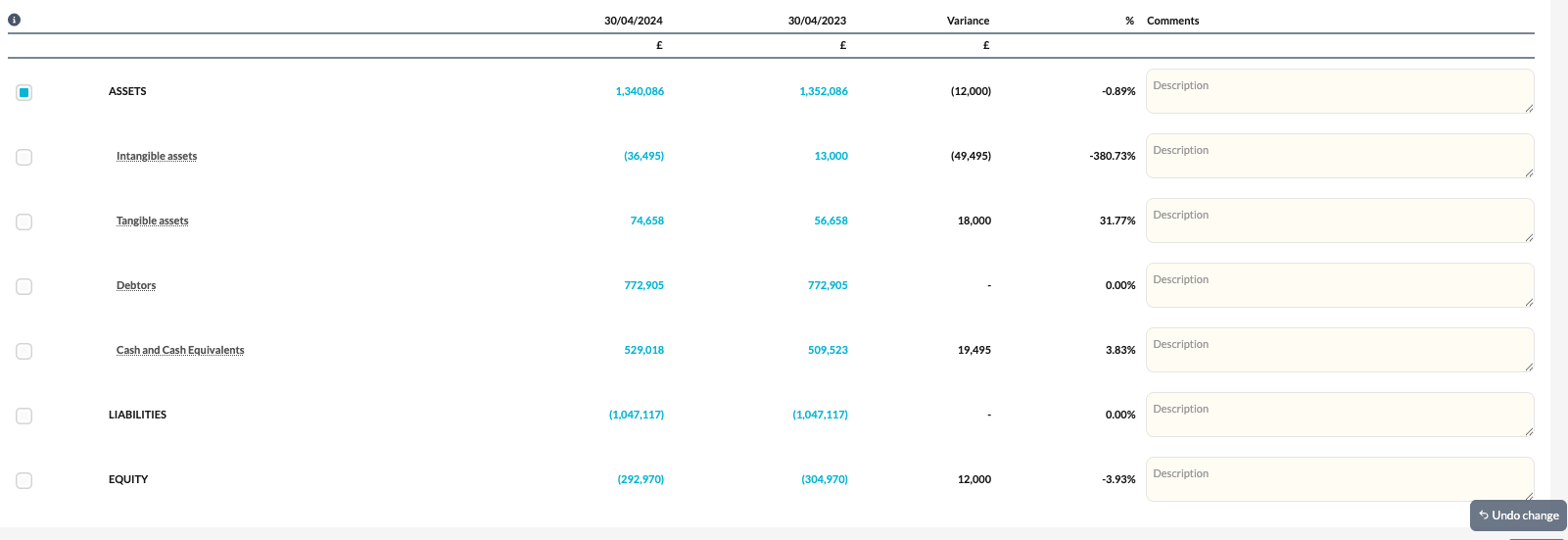
A row at any tier is only shown if it (or one of the accounts within its range) has a non-zero balance in the current or comparative period — this specifically prevents a section from being hidden just because it nets to zero when the underlying accounts don't (e.g. Accruals and deferred income showing as £0 net while the accrual and prepayment accounts underneath both have balances).
Every section, sub-section and category row has its own free-text comment box (placeholder "Description") for recording your explanation of the balance or its movement — this is where the actual review evidence goes.
Once a comparative period exists, the template automatically adds a Variance column (£) and a % column next to the current and comparative figures, with the sign handled correctly for liabilities/equity balances that are naturally credit rather than debit. If no comparative period exists yet (e.g. the company's first year in Silverfin, or the first quarter/month of a monthly/quarterly comparison), those columns and the comparative column simply don't appear.
What flows through to the rest of the accounts/workflow?
Nothing. This is a standalone review working paper — no other template reads its figures, and it doesn't populate any note, disclosure or iXBRL tag. Its value is the evidenced review itself (the ticked-open detail and the comments recorded against each line), not any output it produces. Unlike the P&L analytical review, there is also no built-in check against a trial balance total — the balance sheet is reviewed section by section rather than reconciled to a single expected figure.
What rolls forward next year?
All of the custom inputs roll forward from period to period in the normal way, since nothing in the template explicitly clears them: the comparison frequency, months-to-compare, format, show-original-accounts and rounding settings; every section/sub-section/category tick-box; every relabelled title; and every comment you've entered. In practice this means the template opens next year already showing the same lines you had expanded and the same sections you'd renamed, with last year's comments still visible until you overtype them for the new period.
Where the data comes from
Figures come straight from the trial balance for the current period and, depending on the comparison frequency chosen, from the equivalent prior period(s) — prior year (period.minus_1y), prior month(s) (period.minus_1p, minus_2p...), or the equivalent prior quarter, worked out from the period's month-end dates. Accounts are grouped into the sections/categories shown using the same standard UK nominal-code mapping ranges used elsewhere in Silverfin's UK templates (e.g. account range 1 for tangible/intangible assets, 14/15 for debtors, 24–27 for creditors, and so on) — there is nothing to map specifically within this template; it relies on the trial balance already being correctly coded.
Frequently asked questions
Why do I only see one column of figures with no variance?
No comparative period exists yet for the frequency you've chosen (e.g. it's the company's first year in Silverfin, or the first month/quarter of a monthly/quarterly comparison). The comparative and variance columns only appear once a prior period is available.
A section shows a small or zero net total, but the tick-box still shows accounts underneath — why?
The template shows a section as long as any account within its range has a balance in either period, even if the section nets close to zero (e.g. Accruals and deferred income). Tick the box to see the individual accounts and confirm the net position is as expected.
Does anything I enter here appear in the accounts or notes?
No. This is a review working paper only — nothing calculated or entered here flows into the primary statements, any note, or an iXBRL tag.
How do I review the profit and loss account in the same way?
Use the companion P&L analytical review template, which mirrors this layout (comparison frequency, rounding, show/hide tiers, variances and comments) for the profit and loss account, and additionally flags if the calculated total doesn't agree with the trial balance.