
| User Roles |  Admin Admin |  Staff contributor Staff contributor | ✗External contributor | ✗Pulse user |
The Tax payments template records the payments (and repayments) of corporation tax made in respect of the period. Together with the calculated liability, it shows how much has been paid and what remains due or repayable. For companies within Quarterly Instalment Payments (QIPs), it also works out the instalment schedule and the interest HMRC charges or pays on it.
Table of contents
- When should I use this template?
- How does the analysis work?
- What flows through to the rest of Corporation Tax?
- Where the data comes from
- What rolls forward next year?
- Frequently asked questions
When should I use this template?
Use it to record corporation tax paid to, or repaid by, HMRC during the period, so the tax account reflects the true position.
How does the analysis work?
- Add a row for each payment or repayment.
- Enter the date and the amount paid / (repaid). Enter repayments as negative amounts.
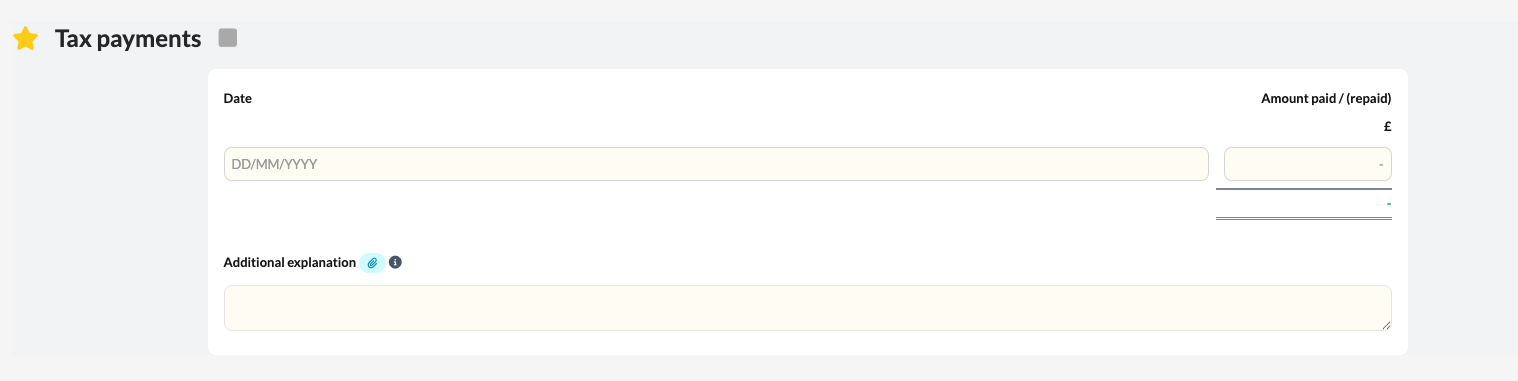
- Use the optional description column to add your own note against each payment, for example "Instalment 1".
The template totals the payments and repayments and, where a long period of account applies, deals with each accounting period in its own block, with its own payments and interest workings.
Companies within Quarterly Instalment Payments
When the large or very large company box is ticked in the Quarterly instalment payments section of Return information, the template shows three sections for each accounting period. For more on QIPs, see How do I work with Quarterly Instalment Payments (QIPs) in Silverfin? (UK market).
Amount due summary: each instalment's due date and amount, worked out under HMRC's rules, including for short accounting periods. If a QIPs estimate was prepared in last year's file, an Estimated amount column shows it alongside the actual amounts due.
Payments made: the running list of what has been paid or repaid, with the description column for your notes.
Final payment position: HMRC debit and credit interest on the running under- or overpaid balance, from the first instalment date up to the normal due date.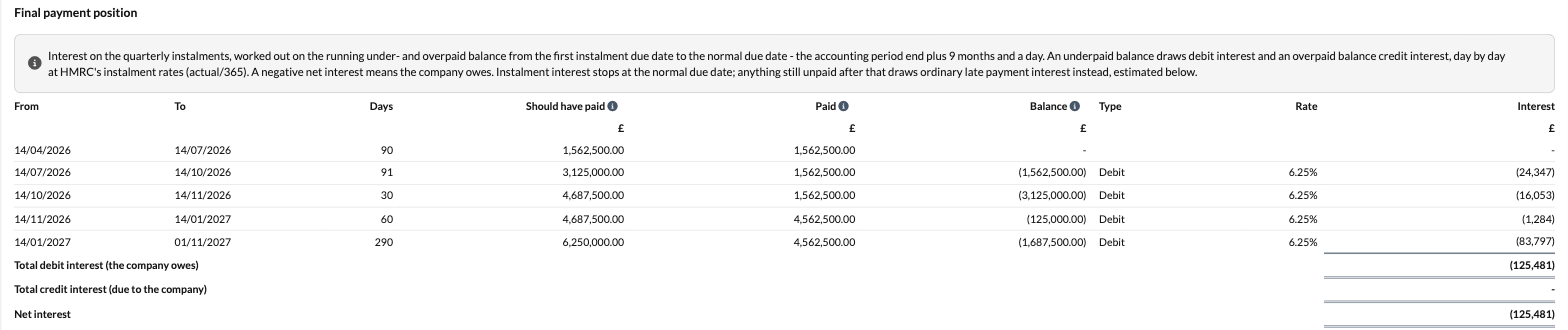
Interest rates: a single table at the foot of the template, used for every accounting period. HMRC's instalment interest rates from August 2024 are provided and shaded so they cannot be typed over. New rates are not added automatically, so a reminder above the table prompts you to check them. Add any new rate below those provided. Rates you add roll forward to next year's file.
Late payment interest estimate
Every accounting period, whether or not it is within QIPs, has an optional late payment interest estimate. Enter the expected payment date and the interest rate, and Silverfin estimates the interest on any tax still outstanding after the normal due date. For QIPs companies it sits beneath the final payment position. It is an estimate only and does not form part of the return.
What flows through to the rest of Corporation Tax?
The total tax paid or repaid feeds the Tax account and Tax reconciliation, where it is compared with the corporation tax liability from the Tax calculation to show the balance outstanding or overpaid.
- The total payments also feed the Tax calculation for each accounting period as tax already paid (CT600 box 595), and so the tax outstanding or overpaid.
- The iXBRL corporation tax computation includes the amount due summary, payments made and final payment position. Your working notes (payment descriptions, the interest rates table and the late payment interest estimate) are left out.
- Instalment interest and the late payment interest estimate are for information only. They do not change the liability or any CT600 box.
Where the data comes from
- The payments and repayments are entered here.
- The corporation tax liability they are compared against comes from the Tax calculation template.
- The totals feed the Tax account and Tax reconciliation to show the balance due or repayable.
- Whether the company is within QIPs comes from the Quarterly instalment payments section of Return information.
- The Estimated amount column comes from the QIPs estimate template in last year's file.
What rolls forward next year?
Payments are specific to each period, so they are cleared when the file rolls forward. Interest rates you have added roll forward. For the late payment interest estimate, the expected payment date and rate are cleared, but whether the estimate is switched on is kept.
Frequently asked questions
How do I record a repayment from HMRC?
Enter it as a negative amount (a repayment) on the relevant date.
What does this template feed?
The Tax account and Tax reconciliation, where payments are compared with the calculated liability to show the balance due or repayable.
Why can't I see the amount due summary?
It only appears for companies within QIPs. Tick the large or very large company box in the Quarterly instalment payments section of Return information.
A new HMRC interest rate has been announced. What do I do?
Add it below the rates provided in the interest rates table, with the date it applies from. The interest calculations update straight away, and the rate rolls forward to next year.
Does the interest calculated here appear on the CT600?
No. Instalment interest and the late payment interest estimate are for information, to help you advise the client.