
| User Roles |  Admin Admin |  Staff contributor Staff contributor | ✗External contributor | ✗Pulse user |
Large and very large companies pay corporation tax in quarterly instalments rather than in one payment nine months and a day after the end of the accounting period. This article explains how the three templates involved fit together, what each control does, and what flows into the return and the computation.
Table of contents
- Which templates handle QIPs?
- When should I use this article?
- Background: how QIPs work
- Before you start
- Step 1: Check the Quarterly instalment payments section in Return information
- Step 2: Forecast next year with the QIPs estimate
- Step 3: Record payments and review interest in Tax payments
- What flows through to the rest of the workflow?
- What rolls forward next year?
- Where the data comes from
- Frequently asked questions
Which templates handle QIPs?
Silverfin now handles quarterly instalment payments (QIPs) across three templates in the UK Corporation Tax workflow:
- Return information works out whether the company is within QIPs for the period, including the year of grace, and records the large and very large company answers that go on the CT600.
- QIPs estimate forecasts the next accounting period, so you can tell a client whether instalments are coming and roughly how much they will be.
- Tax payments sets out each instalment due, the payments made against them, and the interest HMRC charges or pays on the running balance.
When should I use this article?
Read this if any of the following apply:
- the company's augmented profits are close to, or above, £1.5 million (less if it has associated companies or a short period)
- Return information shows a red, amber or blue message in the Quarterly instalment payments section and you want to understand it
- you need to forecast whether a client will be paying by instalments next year
- you want to record instalment payments and see the interest position
Background: how QIPs work
A company is large for QIPs where its augmented profits for the accounting period exceed £1.5 million, and very large where they exceed £20 million. Augmented profits are taxable total profits plus exempt distributions (franked investment income) received.
Both thresholds are reduced:
- for short periods, in proportion to the length of the accounting period
- for associated companies, by dividing by the number of companies (including this one) that were associated at the end of the previous accounting period
The year of grace
A large company does not pay by instalments in the first year it exceeds the threshold, as long as it was not large in the previous year. This is the year of grace. It does not apply where augmented profits exceed £10 million (also scaled for period length and associated companies), and very large companies never get one.
When instalments are due
A large company's first instalment is due 6 months and 13 days after the accounting period starts, then every three months, with the last one 3 months and 14 days after the period ends. A very large company pays four months earlier, so its first instalment is due 2 months and 13 days after the period starts. A 12-month period has four instalments, each a quarter of the liability.
Interest
HMRC charges interest on instalments paid late or underpaid, and pays interest on overpayments, at special instalment rates that differ from the ordinary late payment rate. Instalment interest runs up to the normal due date, nine months and a day after the end of the accounting period. Tax still unpaid after that attracts ordinary late payment interest instead.
Before you start
- Complete the income, losses and tax calculation templates first. The QIPs test uses augmented profits from the Taxable income and Dividend income templates, and the instalments are based on the liability in the Tax calculation.
- Complete the Associated companies section of Return information, including the new Number of associates at end of prior accounting period input.
- The QIPs test applies to period ends on or after 31 March 2022.
Step 1: Check the Quarterly instalment payments section in Return information
The Quarterly instalment payments section sits in Return information, below Associated companies. It opens with a message telling you the company's QIPs position for the period, followed by three questions.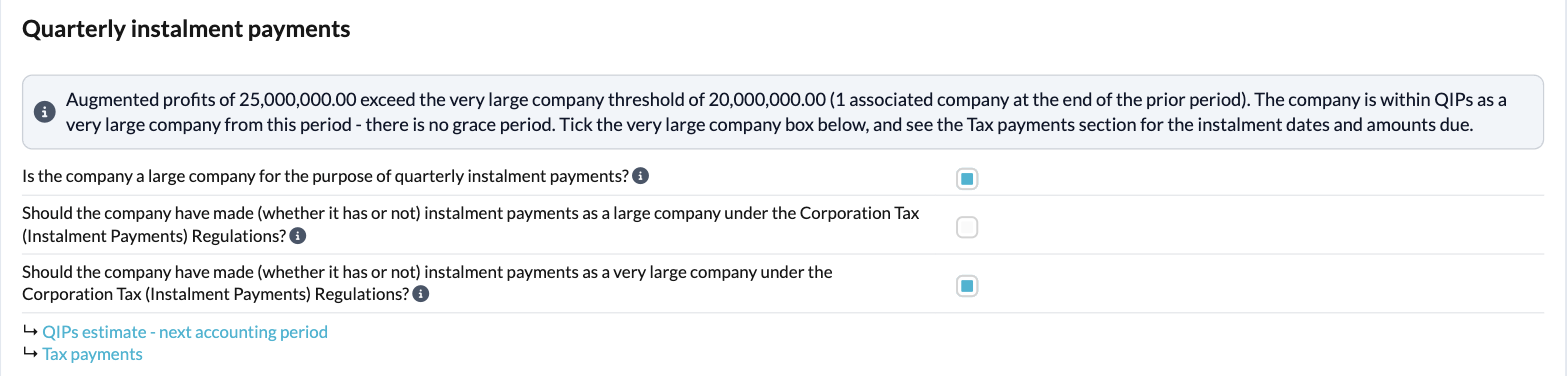
The QIPs message
Silverfin compares the period's augmented profits with the thresholds, scaled for the length of the period and the number of associated companies at the end of the previous accounting period. The message quotes the figures it used, so you can check them. On a long period of account, each accounting period gets its own message.
| Message | What it means | What to do |
| Red: "...exceed the very large company threshold... The company is within QIPs as a very large company from this period - there is no grace period." | The company is very large and must pay by instalments. | Tick the very large company box. The message turns blue once you have. |
| Red: "...exceed the large company threshold... The company is within QIPs as a large company from this period." | The company is large and was also large last year, or its profits exceed the £10m ceiling (the message says so), so there is no year of grace. | Tick the large company box. The message turns blue once you have. |
| Amber: "...but the previous period was below it... This is the year of grace, so the company is not yet within QIPs." | The company is large for the first time and below the ceiling, so no instalments are due this year. | Leave the instalment boxes unticked. Use the QIPs estimate to see whether next year will be within QIPs. |
| Blue: "...do not exceed the large company threshold... so the company is not within QIPs for this period." | QIPs do not apply. | Nothing, unless a box is ticked: see the cautions below. |
How the year of grace is tested. Silverfin looks straight back at last year's Return information and recalculates last year's position from last year's own profits, period length and associated companies. If you change last year's figures, this year's message updates straight away, without a roll forward. Where there is no previous period in Silverfin to look back to, the year of grace is assumed and the message says so: confirm the company was below the large threshold in the previous period.
The three questions
| Question | What it is for |
| Is the company a large company for the purpose of quarterly instalment payments? | Tick where the company is within QIPs. It makes the CT600 associated companies box (box 326) use the number of associated companies at the end of the previous accounting period, which is the count that applies for QIPs. |
| Should the company have made (whether it has or not) instalment payments as a large company...? | CT600 box 630. Tick where the company is large and within QIPs. |
| Should the company have made (whether it has or not) instalment payments as a very large company...? | CT600 box 631. Tick where the company is very large. |
Each question has a hover text explaining the rule, with a reference to the HMRC manual. Silverfin does not tick the boxes for you, because they are your declaration on the return, but it helps you get them right:
- Where the company is within QIPs, the box that applies becomes compulsory and is outlined in red until you tick it.
- Where a box is ticked but augmented profits are below the threshold, an amber hover caution asks you to check whether it has been ticked in error. Instalments can be paid voluntarily, so this is advisory rather than an error.
- If both the large and the very large instalment boxes are ticked, a red warning tells you the company cannot be both, and Return information stays unreconciled until you untick one.
Links below the questions take you to the QIPs estimate - next accounting period and, where instalments are due, to Tax payments.
Number of associates at end of prior accounting period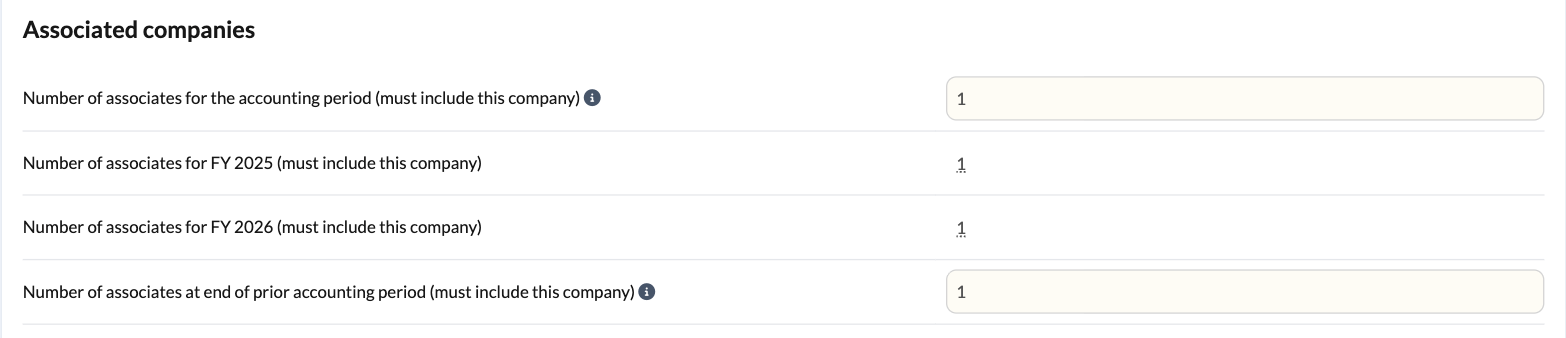
This input sits in the Associated companies section. It is the count used to scale the QIPs thresholds, and it must include this company. It defaults to the number of associated companies rolled forward from last year's return, so in most files you only need to check it. On a long period of account, the second accounting period defaults to the first period's count. If nothing has been rolled forward the field is blank and compulsory.
Step 2: Forecast next year with the QIPs estimate
The QIPs estimate template projects the accounting period after the one you are filing, so you can warn a client before instalments catch them out. It is a working paper only and does not form part of the return or the computation.
Estimate for the period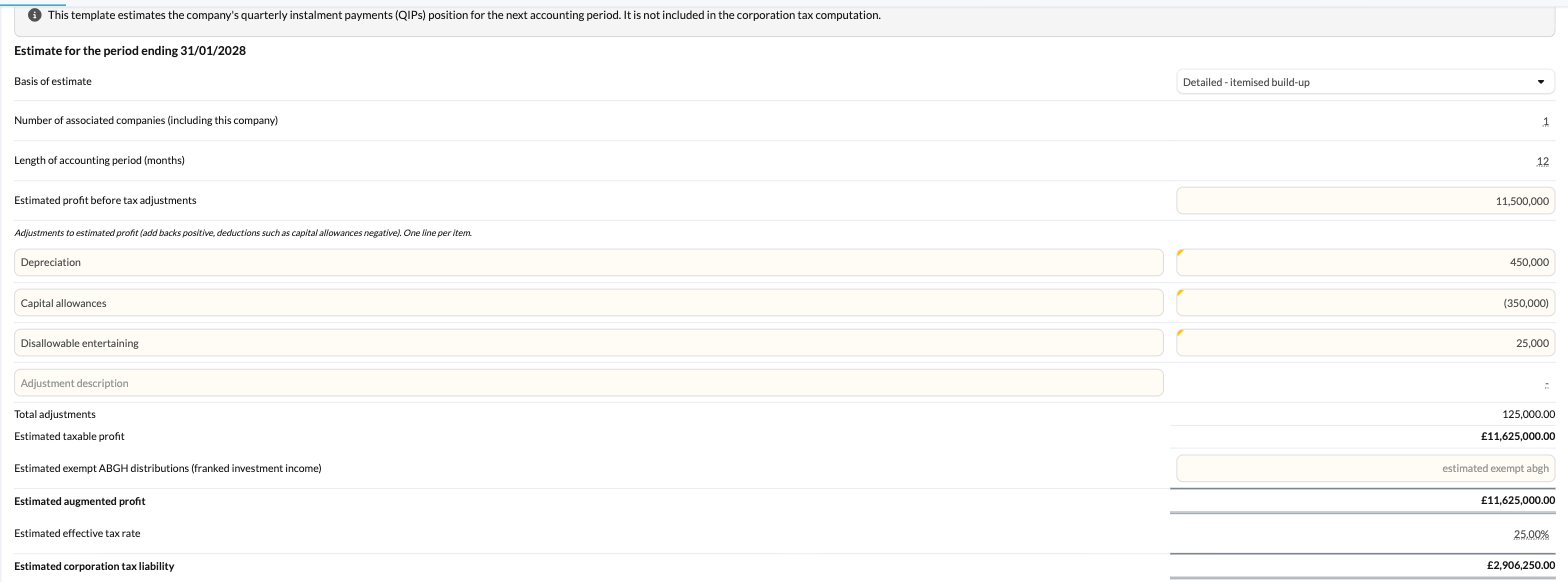
- Basis of estimate: choose Simple - single estimated profit to enter one figure, or Detailed - itemised build-up to enter an estimated profit before tax adjustments and then add or deduct adjustments line by line (add-backs positive, deductions such as capital allowances negative).
- Number of associated companies (including this company): defaults to the count in Return information for the period you are filing.
- Length of accounting period (months): defaults to 12, or to the length of next year's period if it has already been set up in Silverfin. It must be at least 1.
- Estimated taxable profit and Estimated exempt ABGH distributions (franked investment income) add up to the estimated augmented profit.
- Estimated effective tax rate: defaults to the rate Silverfin works out from the estimated profit, applying the small profits rate, the main rate or marginal relief for the financial year next year's period starts in. You can override it, and the estimated corporation tax liability is recalculated from whatever rate is showing.
Forecast QIPs position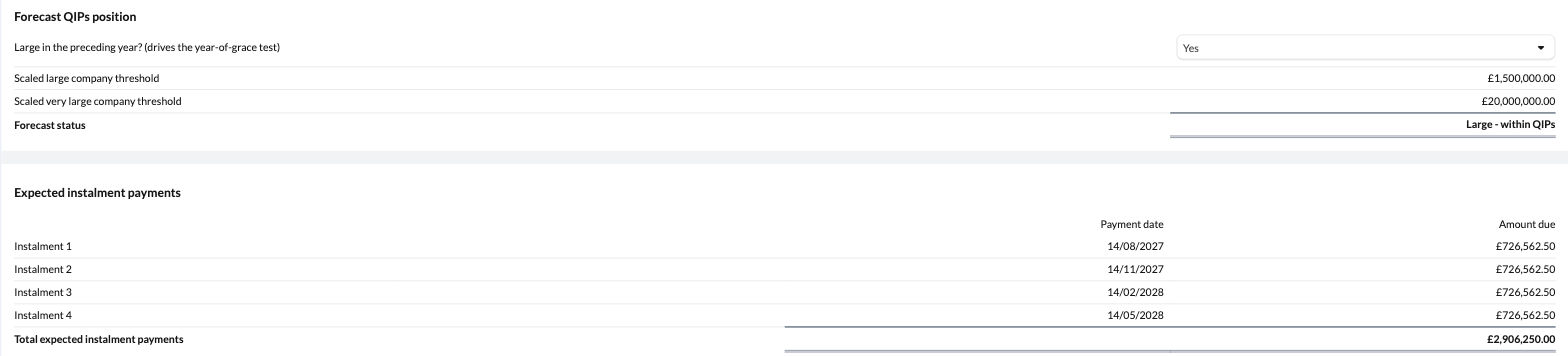
- Large in the preceding year? (drives the year-of-grace test): defaults to Yes where Return information shows the company is large for the period you are filing. You can change it, but if you answer No when Return information says the company was large, an amber hover caution shows last year's figures and asks you to reconsider.
- Scaled large company threshold and Scaled very large company threshold show the £1.5m and £20m thresholds scaled for the period length and the number of associated companies.
- Forecast status reads one of: Not large - QIPs do not apply, Large - year of grace (not yet within QIPs), Large - within QIPs, Large - within QIPs (above grace threshold) or Very large - within QIPs (no grace period). A short explanation sits beneath it. Where the forecast is a year of grace, it reminds you to re-forecast next year to confirm the company stays above the threshold.
Expected instalment payments
Where the forecast is within QIPs, Silverfin lists the expected instalments: one for every three months of the period, starting 6 months and 13 days after the period begins (2 months and 13 days for a very large company), with the estimated liability split equally between them. Otherwise it says no instalments are expected.
When you roll forward, next year's Tax payments shows this year's estimate alongside the actual amounts due, so you can see how the forecast compared.
Step 3: Record payments and review interest in Tax payments
Tax payments changes shape depending on the answers in Return information. Where the large or very large instalment box is ticked for an accounting period, that period gets the full instalment schedule. Otherwise it keeps the single payments table it always had.
Amount due summary
A table of each instalment's due date and actual amount due, worked out from the liability in the Tax calculation under HMRC's rules. Where both boxes are ticked, the very large company timing is used.
- Short accounting periods have fewer instalments. Each one except the last is the liability multiplied by 3 and divided by the number of months in the period, measured in whole months plus any part month, and the last instalment takes the balance so the total always matches the liability. Where the first instalment date would not fall before the final date, the whole liability is due on the final date.
- Estimated amount column: where last year's QIPs estimate forecast instalments for this period, an extra column shows them next to the actual amounts. A hover note warns you if the period length used in the estimate differs from the actual period. This column is a working note and does not appear in the preview or export.
Payments made
A running list of payments to, and repayments from, HMRC for the accounting period. Enter the date, an optional description for your own reference, and the amount. Enter a repayment as a negative amount. The total feeds the Tax calculation as tax already paid (CT600 box 595), on each accounting period of a long period of account.
Payments are a running account rather than being matched to particular instalments.
Final payment position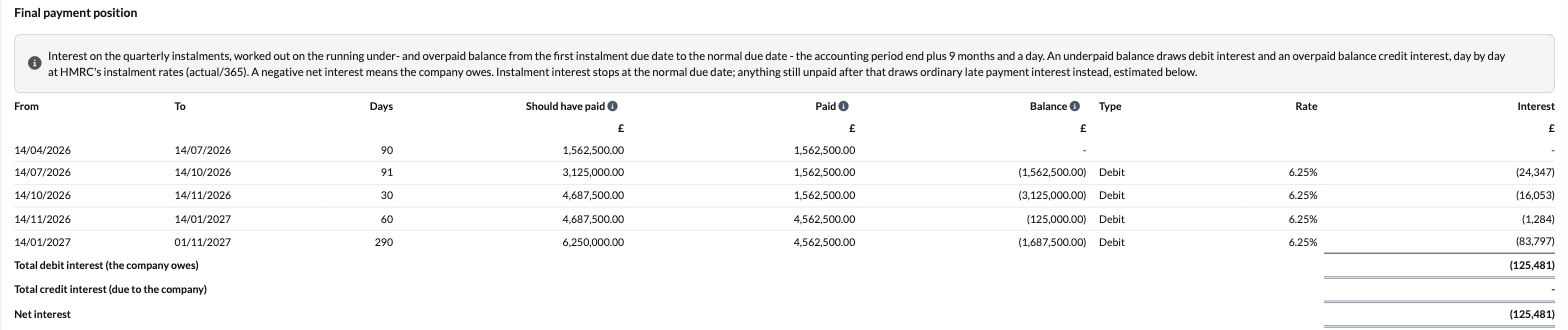
This table works out HMRC's instalment interest on the running underpaid or overpaid balance, from the first instalment due date to the normal due date. A hover text above the table explains the method.
- A new row starts whenever an instalment falls due, a payment is made, or an interest rate changes. Each row shows the position at the start of the row: what should have been paid, what has been paid, the balance, whether it is a debit (underpaid) or credit (overpaid), the rate and the interest.
- Interest does not run on the day an instalment falls due or a payment is made, so a row can show one day fewer than the gap between its dates. A rate change does not lose a day.
- Interest is simple, calculated over a 365-day year, and rounded to whole pounds per row.
- The totals show debit interest (the company owes), credit interest (due to the company) and the net position. A negative net figure means the company owes interest.
- Payments made before the first instalment count in full. Payments on or after the normal due date are left out, because they fall under ordinary late payment interest.
- The table appears even where nothing has been paid, in which case the whole liability is underpaid for the whole period.
Quarterly instalment payment interest rates
At the foot of the template, a table lists HMRC's instalment interest rates: the date each rate applies from, the underpaid (debit) rate and the overpaid (credit) rate.
- Rates from August 2024 are provided and shaded, so they cannot be typed over.
- New HMRC rates are not added automatically. An amber caution reminds you to check you have the latest rate. Add a row with the date it applies from and both rates. You can also add older rates if an instalment falls before the earliest rate provided, and an amber caution above the Final payment position warns you when that happens.
- All three fields on a row are compulsory, and a rate must be above nil. A part-entered row is ignored until it is complete.
- If a row repeats a date that already has a rate, the existing rate stands and a red warning asks you to remove the duplicate or change its date. The template stays unreconciled until you do.
- Rates you add roll forward to next year's file, so you only enter each one once.
Late payment interest estimate
Every accounting period has a Late payment interest estimate tick box, whether or not it is within QIPs. Ticking it lets you enter an estimated payment date and the late payment interest rate, and Silverfin estimates the interest on the tax still outstanding (box 600) from the normal due date to that date, over a 365-day year. The ordinary late payment rate is not provided, so enter the current rate yourself.
For a company within QIPs the estimate sits below the Final payment position, labelled Late payment interest estimate on final liability. It runs after instalment interest stops, so the two never overlap. It is an estimate only and does not form part of the return.
What flows through to the rest of the workflow?
| Item | Where it goes |
| Large company instalments question | CT600 box 630 |
| Very large company instalments question | CT600 box 631 |
| Is the company a large company...? | CT600 box 326 uses the number of associated companies at the end of the previous accounting period |
| Instalment answers per accounting period | Decide whether Tax payments shows the instalment schedule for that period |
| Payments made | Tax calculation: tax already paid (box 595), and so tax outstanding (box 600) or overpaid (box 605) |
| Amount due summary, Payments made, Final payment position | The tax computation PDF and the iXBRL computation submitted to HMRC |
| QIPs estimate | Next year's Tax payments (Estimated amount column) only; not the return or computation |
The following are working notes and stay out of the preview and the iXBRL computation: payment descriptions, the Estimated amount column, the interest rates table, the late payment interest estimate and the QIPs estimate. Instalment interest is not part of the CT600.
What rolls forward next year?
- Return information: the number of associated companies rolls forward and becomes next year's default for the count at the end of the prior accounting period. The year of grace is always worked out from last year's live figures, not a rolled-forward answer.
- QIPs estimate: next year's Tax payments reads this year's expected instalments for the Estimated amount column.
- Tax payments: payment rows carry over with their date, description and amount cleared. Rates you added to the interest rates table carry over with their values. The late payment interest estimate's date and rate are cleared, but the tick box keeps its setting.
Where the data comes from
- Augmented profits come from the Taxable income and Dividend income templates.
- The £1.5m, £20m and £10m thresholds are held in Rates and allowances and scaled using the period length from Input schedules.
- The liability for each accounting period comes from the Tax calculation.
- The number of associated companies is entered in the Associated companies section of Return information.
- Instalment interest rates are provided with the Tax payments template, plus any you add.
Frequently asked questions
Why is the QIPs message red when the company has paid its instalments?
The message turns blue once the large or very large instalment box is ticked. It reflects your answer on the return, not whether the tax has been paid.
The company is above £1.5 million but Silverfin says it is not within QIPs. Why?
Either the threshold has been reduced for associated companies or a short period, so the company is actually below it, or this is the year of grace. Check the threshold and the number of associated companies quoted in the message.
Why has the year of grace not been applied?
Either the company was also large last year, its augmented profits exceed the scaled £10 million ceiling, or it is very large. The message says which.
Silverfin has assumed a year of grace but the company was large last year.
There is no previous period in Silverfin to look back to. Tick the large company instalments box if the company was large last year and is therefore within QIPs.
The interest looks wrong.
Check the interest rates table has every rate change in the period, including the latest HMRC rate. Then check the payment dates: a payment entered on or after the normal due date is excluded from instalment interest.
Does Silverfin calculate late payment interest for me?
Only as an optional estimate. Tick Late payment interest estimate in Tax payments and enter the expected payment date and the current late payment rate.
Does the QIPs estimate affect the return?
No. It is a forecast for next year and stays out of the return and the computation.
Does this work for a long period of account?
Yes. Each accounting period has its own QIPs message and answers in Return information, and its own schedule, payments, interest and late payment estimate in Tax payments. The interest rates table appears once, because rates are date-based.
This article is guidance on how the templates work and does not constitute tax advice. Where a company's QIPs position is unclear, please take your own professional advice or check with HMRC.